PDFGen Class
Properties Methods Events Config Settings Errors
The PDFGen class creates PDF documents from scratch.
Class Name
PDFSDK_PDFGen
Procedural Interface
 pdfsdk_pdfgen_open();
 pdfsdk_pdfgen_close($res);
 pdfsdk_pdfgen_register_callback($res, $id, $function);
 pdfsdk_pdfgen_get_last_error($res);
 pdfsdk_pdfgen_get_last_error_code($res);
 pdfsdk_pdfgen_set($res, $id, $index, $value);
 pdfsdk_pdfgen_get($res, $id, $index);
 pdfsdk_pdfgen_do_addattachment($res, $filename, $description, $attachmenttype);
 pdfsdk_pdfgen_do_addbitmap($res, $format, $bytes, $bitmapwidth, $bitmapheight, $scalewidth, $scaleheight);
 pdfsdk_pdfgen_do_addbreak($res, $breakkind, $count);
 pdfsdk_pdfgen_do_addbutton($res, $fieldname, $caption, $actiontype, $width, $height);
 pdfsdk_pdfgen_do_addcheckbox($res, $fieldname, $defaultvalue, $width, $height);
 pdfsdk_pdfgen_do_addcombobox($res, $fieldname, $options, $defaultvalue, $width, $height);
 pdfsdk_pdfgen_do_addcopy($res, $id, $scalex, $scaley, $rotation, $skewa, $skewb);
 pdfsdk_pdfgen_do_adddrawing($res, $svgpath, $scalex, $scaley);
 pdfsdk_pdfgen_do_addheading($res, $level, $text);
 pdfsdk_pdfgen_do_addlink($res, $text, $url);
 pdfsdk_pdfgen_do_addlistbox($res, $fieldname, $options, $defaultvalue, $width, $height);
 pdfsdk_pdfgen_do_addlistitem($res, $text);
 pdfsdk_pdfgen_do_addparagraph($res, $text);
 pdfsdk_pdfgen_do_addradiobutton($res, $fieldname, $radiogroup, $isdefaultbutton, $width, $height);
 pdfsdk_pdfgen_do_addsignaturefield($res, $fieldname, $width, $height);
 pdfsdk_pdfgen_do_addspecial($res, $objecttype, $content);
 pdfsdk_pdfgen_do_addtablecell($res, $text, $width);
 pdfsdk_pdfgen_do_addtext($res, $text, $wrappable);
 pdfsdk_pdfgen_do_addtextbox($res, $fieldname, $defaultvalue, $multiline, $password, $width, $height);
 pdfsdk_pdfgen_do_addtitle($res, $text);
 pdfsdk_pdfgen_do_cancel($res);
 pdfsdk_pdfgen_do_close($res);
 pdfsdk_pdfgen_do_config($res, $configurationstring);
 pdfsdk_pdfgen_do_createnew($res);
 pdfsdk_pdfgen_do_drawcircle($res, $radiusx, $radiusy);
 pdfsdk_pdfgen_do_drawcurveto($res, $x, $y, $viax1, $viay1, $viax2, $viay2);
 pdfsdk_pdfgen_do_drawlineto($res, $x, $y);
 pdfsdk_pdfgen_do_drawpolygon($res, $points);
 pdfsdk_pdfgen_do_drawrectangle($res, $width, $height, $cornerradius);
 pdfsdk_pdfgen_do_endcombobox($res);
 pdfsdk_pdfgen_do_endcontent($res);
 pdfsdk_pdfgen_do_enddrawing($res, $scalex, $scaley, $rotation, $skewa, $skewb, $canvasid);
 pdfsdk_pdfgen_do_endediting($res, $scalex, $scaley, $rotation, $skewa, $skewb, $canvasid);
 pdfsdk_pdfgen_do_endform($res);
 pdfsdk_pdfgen_do_endlist($res, $listid);
 pdfsdk_pdfgen_do_endlistbox($res);
 pdfsdk_pdfgen_do_endlistitem($res, $canvasid);
 pdfsdk_pdfgen_do_endparagraph($res, $paraid);
 pdfsdk_pdfgen_do_endpath($res, $closepath, $pathid);
 pdfsdk_pdfgen_do_endsignaturefield($res, $scalex, $scaley, $rotation, $skewa, $skewb, $canvasid);
 pdfsdk_pdfgen_do_endtable($res, $canvasid);
 pdfsdk_pdfgen_do_endtablecell($res, $canvasid);
 pdfsdk_pdfgen_do_endtablerow($res, $rowid);
 pdfsdk_pdfgen_do_getdocumentproperty($res, $documentproperty);
 pdfsdk_pdfgen_do_getfieldproperty($res, $fieldname, $fieldproperty);
 pdfsdk_pdfgen_do_getpageproperty($res, $pageproperty);
 pdfsdk_pdfgen_do_moveto($res, $x, $y);
 pdfsdk_pdfgen_do_removeattachment($res, $index);
 pdfsdk_pdfgen_do_reset($res);
 pdfsdk_pdfgen_do_savestyle($res, $styleid);
 pdfsdk_pdfgen_do_scroll($res, $height);
 pdfsdk_pdfgen_do_setalignment($res, $horizontalalignment, $verticalalignment);
 pdfsdk_pdfgen_do_setbrush($res, $color, $opacity);
 pdfsdk_pdfgen_do_setdocumentproperty($res, $documentproperty, $value);
 pdfsdk_pdfgen_do_setfieldproperty($res, $fieldname, $fieldproperty, $value);
 pdfsdk_pdfgen_do_setfont($res, $name, $size, $style, $color);
 pdfsdk_pdfgen_do_setlayout($res, $size, $colcount, $contentanchor);
 pdfsdk_pdfgen_do_setmargin($res, $margintype, $value);
 pdfsdk_pdfgen_do_setpageproperty($res, $pageproperty, $value);
 pdfsdk_pdfgen_do_setpen($res, $thickness, $style, $color, $opacity);
 pdfsdk_pdfgen_do_setstyle($res, $styleid);
 pdfsdk_pdfgen_do_startcombobox($res, $fieldname, $width, $height);
 pdfsdk_pdfgen_do_startcontent($res, $contenttype, $title, $attributes);
 pdfsdk_pdfgen_do_startdrawing($res, $width, $height);
 pdfsdk_pdfgen_do_startediting($res, $width, $height, $contentanchor);
 pdfsdk_pdfgen_do_startform($res, $submiturl);
 pdfsdk_pdfgen_do_startlist($res, $marker);
 pdfsdk_pdfgen_do_startlistbox($res, $fieldname, $width, $height);
 pdfsdk_pdfgen_do_startlistitem($res);
 pdfsdk_pdfgen_do_startparagraph($res);
 pdfsdk_pdfgen_do_startpath($res, $drawingmode);
 pdfsdk_pdfgen_do_startsignaturefield($res, $fieldname, $width, $height, $drawing);
 pdfsdk_pdfgen_do_starttable($res, $colcount, $width);
 pdfsdk_pdfgen_do_starttablecell($res, $width, $colspan, $rowspan, $borders, $contentanchor);
 pdfsdk_pdfgen_do_starttablerow($res, $height, $isheader);
Remarks
PDFGen is a versatile document generation class that can be used to create PDF documents in a highly customizable way.
Preparing the document for editing is as easy as calling CreateNew. Before calling this method, optionally configure baseline properties that you would like to apply to the new document, such as its page dimensions (SetLayout), page numbering (SetDocumentProperty), or PDF/A compliance requirements (PDFAConformanceLevel). Then start composing the document by adding content. When finished, call Close to close the document and save the changes to either OutputFile or OutputData.
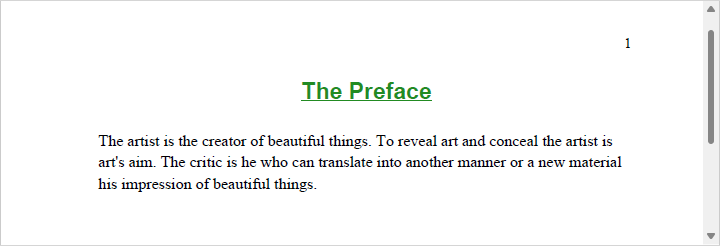
The example below configures page numbers in the right header, adds a centered title with bold and underline formatting, and finally adds a left-aligned paragraph.
PDFGen pdfgen = new PDFGen();
pdfgen.OutputFile = "output.pdf";
pdfgen.SetDocumentProperty("PageRightHeader", "%PAGENUMBER%");
pdfgen.CreateNew();

pdfgen.SetAlignment((int)HorizontalAlignments.haCenter, (int)VerticalAlignments.vaTop);
pdfgen.SetFont("Arial", "20", "bold underline", "forestgreen");
pdfgen.AddText("The Preface", false);
pdfgen.SetFont("Times New Roman", "14", "regular", "black");

pdfgen.AddBreak(0, 2);

pdfgen.SetAlignment((int)HorizontalAlignments.haLeft, (int)VerticalAlignments.vaTop);
pdfgen.AddParagraph("The artist is the creator of beautiful things. To reveal art and conceal the artist is art's aim. The critic is he who can translate into another manner or a new material his impression of beautiful things.");

pdfgen.Close();
Canvases and the Editing Process
Every editing operation performed by PDFGen goes through a canvas, which is an editing window with a set of rules and operations defined for it that is either:
- A text canvas, which can be thought of as a multi-line rich text editor;
- A drawing canvas, a rectangular random-access drawing area; or
- A table canvas, a rectangular grid of rows and columns.
The canvas types are distinct, meaning only one of them can be used at a time to create a specific piece of content. Canvases of different types can be grouped together or used as part of other canvases, which provides a powerful and flexible tool for creating content of various types and complexities. For example, a drawing canvas containing a graphic can be embedded into a text canvas containing the document body.
When CreateNew is called, the class automatically creates a page-wide text canvas (a "page canvas") so you can start adding content right away. This canvas takes into account the dimensions of the page and any margins configured. One-inch margins are set by default. Upon reaching the end of the page, the class closes the corresponding canvas, creates a new one for the next page (thus "turning the page" behind the scenes), and continues until all the content has been added.
You can always create your own canvases (and sub-canvases) should you need to add non-standard kinds of content that go beyond the traditional document layout, such as marginal notes, watermarks, or signatures.
Additionally, a canvas exists in one of three states:
- Open, where it is in the process of editing and the content can still be changed;
- Closed, where editing has been completed and the content has been finalized ("committed"); or
- Rendered, where the content has been serialized from its internal closed representation into a PDF graphics stream.
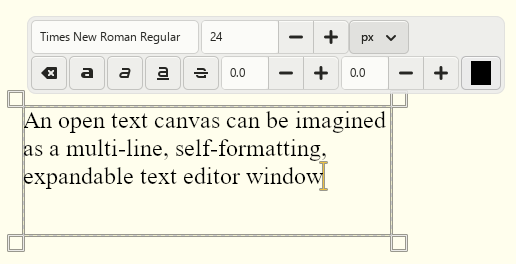
Changes made to an open canvas may influence how the content is represented in the document when the canvas is eventually rendered. For example, any text added to a center-aligned line in a text canvas will cause existing text to move leftward. Any text added to a drawing canvas - which is random access and does not offer the capability of formatting - will not affect any other content added to it previously.
A closed canvas resembles an opaque rectangle filled with visual elements. Once a canvas is closed, all such elements become locked and their dimensions are known, which enables their absolute positions and sizes to be calculated unambiguously as the class can be certain that they will not change.
During the editing process, PDFGen creates pieces of content, fills them in, closes them, and renders them onto the page. It adds content to the document sequentially like a typewriter: once added, content cannot be deleted. However, unlike a typewriter, content can be automatically formatted by the class on a later stage. For example, updating the dimensions of a text canvas may cause elements added to it previously to be rearranged, similar to how expanding a text area control in a browser form rearranges its content.
Text Canvases
A text canvas is a vertical series of lines, each comprised of a horizontal series of elements. It is analogous to a traditional text editor and is used for creating structured (mostly textual) content, which is added element by element, line by line. Pages, signature fields added via AddSignatureField, and table cells are all kinds of text canvases.Random access is not allowed in text canvases; instead, the class stacks elements in the current line and arranges them as they are added. This means that in general, the dimensions of a text canvas (its CanvasWidth and CanvasHeight) are not fixed and may expand horizontally and vertically.
If the current line is full and cannot accommodate a subsequent element (and the chosen constraints do not allow for it to be expanded), in most cases the class completes the current line, adds a new one, places the cursor at the beginning of the new line, and adds the element there. However, if the element's width exceeds CanvasMaxWidth, it will not fit in the new line either, so the OutOfSpace event fires to give your code a chance to forcefully expand the canvas or cancel the insertion of the element altogether.
Similarly, exceeding CanvasMaxHeight also causes the class to automatically wrap to the next default canvas (e.g., the next page or column) or trigger OutOfSpace. Subscribe to that event to recover from failed calls in a flexible way.
Drawing Canvases
A drawing canvas is analogous to a drawing board and is used for creating free-form vector content in two-dimensional Cartesian space. A drawing canvas provides random access: primitives can be placed anywhere within its bounds in any order, and all coordinates are specified relative to the bottom-left corner of the canvas.Content is built from path primitives, which include lines, curves, and closed shapes that can be stroked, filled, or used to define clipping regions. Common shapes such as rectangles, circles, and polygons are also supported directly, as is importing SVG path data via AddDrawing and placing bitmaps via AddBitmap.
The visual appearance of each primitive is controlled by the active Pen and Brush at the time the path is started. The pen governs the stroke (color, thickness, style, line cap, and line join) and the brush governs the fill (color and opacity). Use SetPen and SetBrush to configure these properties; they remain in effect until changed.
The dimensions of a drawing canvas are fixed at creation time. Content that exceeds these bounds is clipped. When committed to its parent canvas via EndDrawing, the drawing canvas can be scaled, skewed, and rotated as needed.
When committed to a text canvas, a drawing canvas is treated as an inline element and flows with surrounding content, just like text and bitmaps. When committed to another drawing canvas, it is positioned at explicit coordinates within that canvas.
Table Canvases
A table canvas is used for creating grid-based content organized into rows and columns. The column count is fixed at creation time; rows and cells are added sequentially, and the layout engine resolves all column widths and row heights when the table is committed to its parent canvas via EndTable.Each cell is itself a text canvas, so any content that can be added to a page can also be added to a cell, including paragraphs, bitmaps, and nested drawing canvases. Cells can span multiple columns or rows, which the layout engine automatically accounts for when distributing space.
Width constraints can be specified at both the table and cell level. When no preferred width is given, the layout engine distributes available space proportionally across columns based on their content. Row heights follow the same principle: the height of each row is determined by the tallest cell it contains, unless a fixed or minimum height is specified via StartTableRow.
The Pen and Brush active when a cell is opened determine its border style and background fill. Individual cell borders can be suppressed via a bitmask passed to StartTableCell, allowing any combination of top, right, bottom, and left borders to be hidden independently.
Property List
The following is the full list of the properties of the class with short descriptions. Click on the links for further details.
| AttachmentCount | The number of records in the Attachment arrays. |
| AttachmentAFRelationship | The value of the AFRelationship key for the attachment, for example Alternative or Source . |
| AttachmentType | The type of the attachment. |
| AttachmentContentType | The content type of the attachment. |
| AttachmentCreationDate | The creation date of the attachment. |
| AttachmentData | The raw data of the attachment. |
| AttachmentDescription | A textual description of the attachment. |
| AttachmentFileName | The path and filename of the attachment. |
| AttachmentModificationDate | The date and time of the file's last modification. |
| AttachmentName | The name of the attachment. |
| AttachmentSize | The attachment's size in bytes. |
| BrushColor | The fill color of the brush in hash-prefixed hexadecimal format or as a name. |
| BrushOpacity | The opacity of the brush fill, from 0 (fully transparent) to 1 (fully opaque). |
| CanvasType | The type of the canvas. |
| CanvasContentAnchor | This property is currently unsupported. |
| CanvasDrawing | Whether the canvas is a random-access drawing canvas. |
| CanvasDrawingMode | How paths interact with the drawing canvas. |
| CanvasHeight | The current height of the canvas in points. |
| CanvasHorizontalAlignment | The current horizontal alignment for text content in the text canvas. |
| CanvasMaxHeight | The maximum height of the canvas in points. |
| CanvasMaxWidth | The maximum width of the canvas in points. |
| CanvasMinHeight | The minimum height of the canvas in points. |
| CanvasMinWidth | The minimum width of the canvas in points. |
| CanvasVerticalAlignment | The current vertical alignment for text content in the text canvas. |
| CanvasWidth | The current width of the canvas in points. |
| CanvasX | The X coordinate of the canvas in points. |
| CanvasY | The Y coordinate of the canvas in points. |
| FontColor | The color of the current font in hash-prefixed hexadecimal format or as a name. |
| FontName | The name of the current font. |
| FontPath | The full file path to the current font, for example C:\\Windows\\Fonts\\times. |
| FontSize | The size of the current font in points. |
| FontStyle | The style of the current font. |
| LayoutColCount | The number of columns on the page. |
| LayoutContentAnchor | This property is currently unsupported. |
| LayoutHeight | The height of the page in points. |
| LayoutSize | The size of the page. |
| LayoutWidth | The width of the page in points. |
| OutputData | A byte array containing the PDF document after processing. |
| OutputFile | The path to a local file where the output is written. |
| Overwrite | Whether the class should overwrite files. |
| PDFAConformanceLevel | The PDF/A conformance level of the document. |
| PenColor | The stroke color of the pen in hash-prefixed hexadecimal format or as a name. |
| PenOpacity | The opacity of the pen stroke, from 0 (fully transparent) to 1 (fully opaque). |
| PenStyle | The style of the pen. |
| PenThickness | The line width of the pen stroke in points. |
Method List
The following is the full list of the methods of the class with short descriptions. Click on the links for further details.
| AddAttachment | Adds an attachment to the document. |
| AddBitmap | Adds a bitmap image to the current canvas. |
| AddBreak | Adds a number of breaks to the text canvas. |
| AddButton | Adds a button field to the form. |
| AddCheckBox | Adds a checkbox field to the form. |
| AddComboBox | Adds a combo box field to the form. |
| AddCopy | Adds a copy of a previously saved element to the current canvas. |
| AddDrawing | Adds a vector drawing described by an SVG path string to the current canvas. |
| AddHeading | Adds a heading to the text canvas. |
| AddLink | Adds a hyperlink to the current canvas. |
| AddListBox | Adds a list box field to the form. |
| AddListItem | Adds an item to a list, combo box, or list box. |
| AddParagraph | Adds a paragraph of text to the text canvas. |
| AddRadioButton | Adds a radio button to the form. |
| AddSignatureField | Adds a signature field to the form. |
| AddSpecial | Adds a special element to the text canvas. |
| AddTableCell | Adds a single-paragraph cell to the current table row. |
| AddText | Adds a piece of text to the current canvas. |
| AddTextBox | Adds a text box field to the form. |
| AddTitle | Adds a title to the text canvas. |
| Cancel | Cancels the current canvas. |
| Close | Closes the new document. |
| Config | Sets or retrieves a configuration setting. |
| CreateNew | Creates a new PDF document. |
| DrawCircle | Draws an ellipse or circle on the drawing canvas. |
| DrawCurveTo | Adds a cubic Bezier curve segment to the current path. |
| DrawLineTo | Adds a straight line segment to the current path. |
| DrawPolygon | Draws a polygon on the drawing canvas. |
| DrawRectangle | Draws a rectangle on the drawing canvas. |
| EndComboBox | Completes the combo box field. |
| EndContent | Completes the logical section. |
| EndDrawing | Finalizes the drawing canvas and commits it to the parent canvas. |
| EndEditing | Finalizes the text canvas and commits it to the parent canvas. |
| EndForm | Completes and closes the current interactive form. |
| EndList | Completes the list. |
| EndListBox | Completes the list box field. |
| EndListItem | Completes the list item. |
| EndParagraph | Completes the paragraph. |
| EndPath | Completes the current path and applies it to the drawing canvas. |
| EndSignatureField | Completes the signature field. |
| EndTable | Finalizes the table canvas and commits it to the parent canvas. |
| EndTableCell | Completes the current table cell. |
| EndTableRow | Completes the current table row. |
| GetDocumentProperty | Returns the value of a document property. |
| GetFieldProperty | Returns the value of a field property. |
| GetPageProperty | Returns the value of a page property. |
| MoveTo | Sets the current pen position on the drawing canvas. |
| RemoveAttachment | Removes an attachment from the document. |
| Reset | Resets the class. |
| SaveStyle | Saves the currently configured font, pen, and brush as a named style. |
| Scroll | Inserts a vertical gap into the text canvas. |
| SetAlignment | Sets the alignment for subsequent text insertion operations. |
| SetBrush | Sets the fill properties used when drawing shapes and cell backgrounds. |
| SetDocumentProperty | Sets the value of a document property. |
| SetFieldProperty | Sets the value of a field property. |
| SetFont | Sets the font properties to be applied to text. |
| SetLayout | Sets the layout for new pages. |
| SetMargin | Sets the margin for a typical element. |
| SetPageProperty | Sets the value of a page property. |
| SetPen | Sets the stroke properties used when drawing lines, paths, and borders. |
| SetStyle | Applies a previously saved style or one of the built-in styles. |
| StartComboBox | Begins a new combo box field for editing. |
| StartContent | Begins a new logical section. |
| StartDrawing | Initiates a new drawing canvas of the given dimensions. |
| StartEditing | Initiates a new text canvas for editing. |
| StartForm | Begins a new form. |
| StartList | Begins a new list for editing. |
| StartListBox | Begins a new list box field for editing. |
| StartListItem | Begins a new list item for editing. |
| StartParagraph | Begins a new paragraph for editing. |
| StartPath | Starts a new vector path on the drawing canvas. |
| StartSignatureField | Begins a new signature field for editing. |
| StartTable | Initiates a new table canvas with a fixed number of columns. |
| StartTableCell | Begins a new cell in the current table row. |
| StartTableRow | Begins a new row in the current table. |
Event List
The following is the full list of the events fired by the class with short descriptions. Click on the links for further details.
| ActionRequired | Fired when the class encounters a conflict that it cannot resolve on its own. |
| EditingCompleted | Fired after a canvas has been closed. |
| Error | Fired when information is available about errors during data delivery. |
| FontLookup | Fired when a required font is missing. |
| Log | Fired once for each log message. |
| OutOfSpace | Fired when an element exceeds the maximum dimensions of the current text canvas. |
Config Settings
The following is a list of config settings for the class with short descriptions. Click on the links for further details.
| AutoTurnPages | Whether to change the page automatically upon exceeding the lower page boundary. |
| CompressStreams | Whether to compress stream objects. |
| FallbackFont | The fallback font. |
| FontPaths | The font search paths. |
| FontPolicy | The font policy to follow. |
| LogLevel | The level of detail that is logged. |
| SaveChanges | Whether to save changes made to the document. |
| SystemFontNames | The system font names. |
| TempPath | The location where temporary files are stored. |
| UsedFonts | The fonts used in the document. |
| BuildInfo | Information about the product's build. |
| CodePage | The system code page used for Unicode to Multibyte translations. |
| LicenseInfo | Information about the current license. |
| MaskSensitiveData | Whether sensitive data is masked in log messages. |
| UseInternalSecurityAPI | Whether or not to use the system security libraries or an internal implementation. |
AttachmentCount Property (PDFSDK_PDFGen Class)
The number of records in the Attachment arrays.
Object Oriented Interface
public function getAttachmentCount();
public function setAttachmentCount($value);
Procedural Interface
pdfsdk_pdfgen_get($res, 1);
pdfsdk_pdfgen_set($res, 1, $value);
Default Value
0
Remarks
This property controls the size of the following arrays:
- AttachmentAFRelationship
- AttachmentContentType
- AttachmentCreationDate
- AttachmentData
- AttachmentDescription
- AttachmentFileName
- AttachmentModificationDate
- AttachmentName
- AttachmentSize
- AttachmentType
This property is not available at design time.
Data Type
Integer
AttachmentAFRelationship Property (PDFSDK_PDFGen Class)
The value of the AFRelationship key for the attachment, for example Alternative or Source .
Object Oriented Interface
public function getAttachmentAFRelationship($attachmentindex);
public function setAttachmentAFRelationship($attachmentindex, $value);
Procedural Interface
pdfsdk_pdfgen_get($res, 2, $attachmentindex);
pdfsdk_pdfgen_set($res, 2, $value, $attachmentindex);
Default Value
''
Remarks
The value of the AFRelationship key for the attachment, for example Alternative or Source.
This key in the file specification dictionary expresses the relationship between the attachment and the document, and it must be set for each attachment added to PDF/A-3 documents.
The $attachmentindex parameter specifies the index of the item in the array. The size of the array is controlled by the AttachmentCount property.
This property is not available at design time.
Data Type
String
AttachmentType Property (PDFSDK_PDFGen Class)
The type of the attachment.
Object Oriented Interface
public function getAttachmentType($attachmentindex);
Procedural Interface
pdfsdk_pdfgen_get($res, 3, $attachmentindex);
Possible Values
PDFGEN_ATTACHMENTTYPE_GENERIC(0),
PDFGEN_ATTACHMENTTYPE_ELECTRONIC_INVOICE(1)
Default Value
0
Remarks
The type of the attachment.
Possible values are:
| 0 (patGeneric - default) | A generic attachment. |
| 1 (patElectronicInvoice) | An XML invoice, for example in ZUGFeRD or Factur-X format. |
The $attachmentindex parameter specifies the index of the item in the array. The size of the array is controlled by the AttachmentCount property.
This property is read-only and not available at design time.
Data Type
Integer
AttachmentContentType Property (PDFSDK_PDFGen Class)
The content type of the attachment.
Object Oriented Interface
public function getAttachmentContentType($attachmentindex);
public function setAttachmentContentType($attachmentindex, $value);
Procedural Interface
pdfsdk_pdfgen_get($res, 4, $attachmentindex);
pdfsdk_pdfgen_set($res, 4, $value, $attachmentindex);
Default Value
''
Remarks
The content type of the attachment.
The $attachmentindex parameter specifies the index of the item in the array. The size of the array is controlled by the AttachmentCount property.
This property is not available at design time.
Data Type
String
AttachmentCreationDate Property (PDFSDK_PDFGen Class)
The creation date of the attachment.
Object Oriented Interface
public function getAttachmentCreationDate($attachmentindex);
public function setAttachmentCreationDate($attachmentindex, $value);
Procedural Interface
pdfsdk_pdfgen_get($res, 5, $attachmentindex);
pdfsdk_pdfgen_set($res, 5, $value, $attachmentindex);
Default Value
''
Remarks
The creation date of the attachment.
The $attachmentindex parameter specifies the index of the item in the array. The size of the array is controlled by the AttachmentCount property.
This property is not available at design time.
Data Type
String
AttachmentData Property (PDFSDK_PDFGen Class)
The raw data of the attachment.
Object Oriented Interface
public function getAttachmentData($attachmentindex);
public function setAttachmentData($attachmentindex, $value);
Procedural Interface
pdfsdk_pdfgen_get($res, 6, $attachmentindex);
pdfsdk_pdfgen_set($res, 6, $value, $attachmentindex);
Default Value
''
Remarks
The raw data of the attachment.
The $attachmentindex parameter specifies the index of the item in the array. The size of the array is controlled by the AttachmentCount property.
This property is not available at design time.
Data Type
Binary String
AttachmentDescription Property (PDFSDK_PDFGen Class)
A textual description of the attachment.
Object Oriented Interface
public function getAttachmentDescription($attachmentindex);
public function setAttachmentDescription($attachmentindex, $value);
Procedural Interface
pdfsdk_pdfgen_get($res, 7, $attachmentindex);
pdfsdk_pdfgen_set($res, 7, $value, $attachmentindex);
Default Value
''
Remarks
A textual description of the attachment.
The $attachmentindex parameter specifies the index of the item in the array. The size of the array is controlled by the AttachmentCount property.
This property is not available at design time.
Data Type
String
AttachmentFileName Property (PDFSDK_PDFGen Class)
The path and filename of the attachment.
Object Oriented Interface
public function getAttachmentFileName($attachmentindex);
public function setAttachmentFileName($attachmentindex, $value);
Procedural Interface
pdfsdk_pdfgen_get($res, 8, $attachmentindex);
pdfsdk_pdfgen_set($res, 8, $value, $attachmentindex);
Default Value
''
Remarks
The path and filename of the attachment.
The $attachmentindex parameter specifies the index of the item in the array. The size of the array is controlled by the AttachmentCount property.
This property is not available at design time.
Data Type
String
AttachmentModificationDate Property (PDFSDK_PDFGen Class)
The date and time of the file's last modification.
Object Oriented Interface
public function getAttachmentModificationDate($attachmentindex);
public function setAttachmentModificationDate($attachmentindex, $value);
Procedural Interface
pdfsdk_pdfgen_get($res, 10, $attachmentindex);
pdfsdk_pdfgen_set($res, 10, $value, $attachmentindex);
Default Value
''
Remarks
The date and time of the file's last modification.
The $attachmentindex parameter specifies the index of the item in the array. The size of the array is controlled by the AttachmentCount property.
This property is not available at design time.
Data Type
String
AttachmentName Property (PDFSDK_PDFGen Class)
The name of the attachment.
Object Oriented Interface
public function getAttachmentName($attachmentindex);
public function setAttachmentName($attachmentindex, $value);
Procedural Interface
pdfsdk_pdfgen_get($res, 11, $attachmentindex);
pdfsdk_pdfgen_set($res, 11, $value, $attachmentindex);
Default Value
''
Remarks
The name of the attachment.
The $attachmentindex parameter specifies the index of the item in the array. The size of the array is controlled by the AttachmentCount property.
This property is not available at design time.
Data Type
String
AttachmentSize Property (PDFSDK_PDFGen Class)
The attachment's size in bytes.
Object Oriented Interface
public function getAttachmentSize($attachmentindex);
Procedural Interface
pdfsdk_pdfgen_get($res, 13, $attachmentindex);
Default Value
0
Remarks
The attachment's size in bytes.
The $attachmentindex parameter specifies the index of the item in the array. The size of the array is controlled by the AttachmentCount property.
This property is read-only and not available at design time.
Data Type
Long64
BrushColor Property (PDFSDK_PDFGen Class)
The fill color of the brush in hash-prefixed hexadecimal format or as a name.
Object Oriented Interface
public function getBrushColor();
Procedural Interface
pdfsdk_pdfgen_get($res, 14);
Default Value
'#FFFFFF'
Remarks
The fill color of the brush in hash-prefixed hexadecimal format or as a name.
Note that a brush with the default color will not produce a visible fill until it has been explicitly activated via SetBrush.
This property is read-only and not available at design time.
Data Type
String
BrushOpacity Property (PDFSDK_PDFGen Class)
The opacity of the brush fill, from 0 (fully transparent) to 1 (fully opaque).
Object Oriented Interface
public function getBrushOpacity();
Procedural Interface
pdfsdk_pdfgen_get($res, 15);
Default Value
''
Remarks
The opacity of the brush fill, from 0 (fully transparent) to 1 (fully opaque).
This property is read-only and not available at design time.
Data Type
String
CanvasType Property (PDFSDK_PDFGen Class)
The type of the canvas.
Object Oriented Interface
public function getCanvasType();
Procedural Interface
pdfsdk_pdfgen_get($res, 16);
Possible Values
PDFGEN_CANVASTYPE_PAGE(0),
PDFGEN_CANVASTYPE_TEXT(1),
PDFGEN_CANVASTYPE_DRAWING(2),
PDFGEN_CANVASTYPE_TABLE(3),
PDFGEN_CANVASTYPE_TABLE_CELL(4),
PDFGEN_CANVASTYPE_SIGNATURE_FIELD(5)
Default Value
0
Remarks
The type of the canvas.
Possible values are:
| 0 (ctPage - default) | |
| 1 (ctText) | |
| 2 (ctDrawing) | |
| 3 (ctTable) | |
| 4 (ctTableCell) | |
| 5 (ctSignatureField) |
This property is also available as a parameter of the EditingCompleted event.
This property is read-only and not available at design time.
Data Type
Integer
CanvasContentAnchor Property (PDFSDK_PDFGen Class)
This property is currently unsupported.
Object Oriented Interface
public function getCanvasContentAnchor();
Procedural Interface
pdfsdk_pdfgen_get($res, 17);
Possible Values
PDFGEN_CANVASCONTENTANCHOR_TOP(0),
PDFGEN_CANVASCONTENTANCHOR_CENTER(1),
PDFGEN_CANVASCONTENTANCHOR_BOTTOM(2)
Default Value
0
Remarks
This property is currently unsupported.
This property is read-only and not available at design time.
Data Type
Integer
CanvasDrawing Property (PDFSDK_PDFGen Class)
Whether the canvas is a random-access drawing canvas.
Object Oriented Interface
public function getCanvasDrawing();
Procedural Interface
pdfsdk_pdfgen_get($res, 18);
Default Value
false
Remarks
Whether the canvas is a random-access drawing canvas.
This property is read-only and not available at design time.
Data Type
Boolean
CanvasDrawingMode Property (PDFSDK_PDFGen Class)
How paths interact with the drawing canvas.
Object Oriented Interface
public function getCanvasDrawingMode();
Procedural Interface
pdfsdk_pdfgen_get($res, 19);
Possible Values
PDFGEN_CANVASDRAWINGMODE_DRAWING(0),
PDFGEN_CANVASDRAWINGMODE_CLIPPING(1),
PDFGEN_CANVASDRAWINGMODE_MASK(2)
Default Value
0
Remarks
How paths interact with the drawing canvas.
Possible values are:
| 0 (dmDrawing) | The path is rendered as a filled and/or stroked shape. |
| 1 (dmClipping) | The path defines a clipping region; subsequent drawing is masked to the interior of this path. |
| 2 (dmMask) | Reserved for future use. |
This property is read-only and not available at design time.
Data Type
Integer
CanvasHeight Property (PDFSDK_PDFGen Class)
The current height of the canvas in points.
Object Oriented Interface
public function getCanvasHeight();
Procedural Interface
pdfsdk_pdfgen_get($res, 20);
Default Value
'0'
Remarks
The current height of the canvas in points.
This property is also available as a parameter of the EditingCompleted event.
This property is read-only and not available at design time.
Data Type
String
CanvasHorizontalAlignment Property (PDFSDK_PDFGen Class)
The current horizontal alignment for text content in the text canvas.
Object Oriented Interface
public function getCanvasHorizontalAlignment();
Procedural Interface
pdfsdk_pdfgen_get($res, 21);
Possible Values
PDFGEN_CANVASHORIZONTALALIGNMENT_LEFT(0),
PDFGEN_CANVASHORIZONTALALIGNMENT_CENTER(1),
PDFGEN_CANVASHORIZONTALALIGNMENT_RIGHT(2),
PDFGEN_CANVASHORIZONTALALIGNMENT_JUSTIFY(3)
Default Value
0
Remarks
The current horizontal alignment for text content in the text canvas.
Possible values are:
| 0 (haLeft - default) | |
| 1 (haCenter) | |
| 2 (haRight) | |
| 3 (haJustify) |
This property is read-only and not available at design time.
Data Type
Integer
CanvasMaxHeight Property (PDFSDK_PDFGen Class)
The maximum height of the canvas in points.
Object Oriented Interface
public function getCanvasMaxHeight();
public function setCanvasMaxHeight($value);
Procedural Interface
pdfsdk_pdfgen_get($res, 22);
pdfsdk_pdfgen_set($res, 22, $value);
Default Value
'0'
Remarks
The maximum height of the canvas in points. Both integer and decimal values are supported.
This property is not available at design time.
Data Type
String
CanvasMaxWidth Property (PDFSDK_PDFGen Class)
The maximum width of the canvas in points.
Object Oriented Interface
public function getCanvasMaxWidth();
public function setCanvasMaxWidth($value);
Procedural Interface
pdfsdk_pdfgen_get($res, 23);
pdfsdk_pdfgen_set($res, 23, $value);
Default Value
'0'
Remarks
The maximum width of the canvas in points. Both integer and decimal values are supported.
This property is not available at design time.
Data Type
String
CanvasMinHeight Property (PDFSDK_PDFGen Class)
The minimum height of the canvas in points.
Object Oriented Interface
public function getCanvasMinHeight();
Procedural Interface
pdfsdk_pdfgen_get($res, 24);
Default Value
'0'
Remarks
The minimum height of the canvas in points.
This property is read-only and not available at design time.
Data Type
String
CanvasMinWidth Property (PDFSDK_PDFGen Class)
The minimum width of the canvas in points.
Object Oriented Interface
public function getCanvasMinWidth();
Procedural Interface
pdfsdk_pdfgen_get($res, 25);
Default Value
'0'
Remarks
The minimum width of the canvas in points.
This property is read-only and not available at design time.
Data Type
String
CanvasVerticalAlignment Property (PDFSDK_PDFGen Class)
The current vertical alignment for text content in the text canvas.
Object Oriented Interface
public function getCanvasVerticalAlignment();
Procedural Interface
pdfsdk_pdfgen_get($res, 26);
Possible Values
PDFGEN_CANVASVERTICALALIGNMENT_TOP(0),
PDFGEN_CANVASVERTICALALIGNMENT_CENTER(1),
PDFGEN_CANVASVERTICALALIGNMENT_BOTTOM(2)
Default Value
0
Remarks
The current vertical alignment for text content in the text canvas.
Possible values are:
| 0 (vaTop - default) | |
| 1 (vaCenter) | |
| 2 (vaBottom) |
This property is read-only and not available at design time.
Data Type
Integer
CanvasWidth Property (PDFSDK_PDFGen Class)
The current width of the canvas in points.
Object Oriented Interface
public function getCanvasWidth();
Procedural Interface
pdfsdk_pdfgen_get($res, 27);
Default Value
'0'
Remarks
The current width of the canvas in points.
This property is also available as a parameter of the EditingCompleted event.
This property is read-only and not available at design time.
Data Type
String
CanvasX Property (PDFSDK_PDFGen Class)
The X coordinate of the canvas in points.
Object Oriented Interface
public function getCanvasX();
Procedural Interface
pdfsdk_pdfgen_get($res, 28);
Default Value
'0'
Remarks
The X coordinate of the canvas in points.
This property is also available as a parameter of the EditingCompleted event.
This property is read-only and not available at design time.
Data Type
String
CanvasY Property (PDFSDK_PDFGen Class)
The Y coordinate of the canvas in points.
Object Oriented Interface
public function getCanvasY();
Procedural Interface
pdfsdk_pdfgen_get($res, 29);
Default Value
'0'
Remarks
The Y coordinate of the canvas in points.
This property is also available as a parameter of the EditingCompleted event.
This property is read-only and not available at design time.
Data Type
String
FontColor Property (PDFSDK_PDFGen Class)
The color of the current font in hash-prefixed hexadecimal format or as a name.
Object Oriented Interface
public function getFontColor();
Procedural Interface
pdfsdk_pdfgen_get($res, 30);
Default Value
'#000000'
Remarks
The color of the current font in hash-prefixed hexadecimal format or as a name.
This property is read-only and not available at design time.
Data Type
String
FontName Property (PDFSDK_PDFGen Class)
The name of the current font.
Object Oriented Interface
public function getFontName();
Procedural Interface
pdfsdk_pdfgen_get($res, 31);
Default Value
'Times New Roman'
Remarks
The name of the current font.
This property is read-only and not available at design time.
Data Type
String
FontPath Property (PDFSDK_PDFGen Class)
The full file path to the current font, for example C:\\Windows\\Fonts\\times.
Object Oriented Interface
public function getFontPath();
Procedural Interface
pdfsdk_pdfgen_get($res, 32);
Default Value
''
Remarks
The full file path to the current font, for example C:\Windows\Fonts\times.ttf.
This property returns an empty string if a built-in font is in use.
This property is read-only and not available at design time.
Data Type
String
FontSize Property (PDFSDK_PDFGen Class)
The size of the current font in points.
Object Oriented Interface
public function getFontSize();
Procedural Interface
pdfsdk_pdfgen_get($res, 33);
Default Value
'12'
Remarks
The size of the current font in points.
This property is read-only and not available at design time.
Data Type
String
FontStyle Property (PDFSDK_PDFGen Class)
The style of the current font.
Object Oriented Interface
public function getFontStyle();
Procedural Interface
pdfsdk_pdfgen_get($res, 34);
Default Value
''
Remarks
The style of the current font.
This property is read-only and not available at design time.
Data Type
String
LayoutColCount Property (PDFSDK_PDFGen Class)
The number of columns on the page.
Object Oriented Interface
public function getLayoutColCount();
Procedural Interface
pdfsdk_pdfgen_get($res, 35);
Default Value
1
Remarks
The number of columns on the page.
This property is read-only and not available at design time.
Data Type
Integer
LayoutContentAnchor Property (PDFSDK_PDFGen Class)
This property is currently unsupported.
Object Oriented Interface
public function getLayoutContentAnchor();
Procedural Interface
pdfsdk_pdfgen_get($res, 36);
Possible Values
PDFGEN_LAYOUTCONTENTANCHOR_TOP(0),
PDFGEN_LAYOUTCONTENTANCHOR_CENTER(1),
PDFGEN_LAYOUTCONTENTANCHOR_BOTTOM(2)
Default Value
0
Remarks
This property is currently unsupported.
This property is read-only and not available at design time.
Data Type
Integer
LayoutHeight Property (PDFSDK_PDFGen Class)
The height of the page in points.
Object Oriented Interface
public function getLayoutHeight();
Procedural Interface
pdfsdk_pdfgen_get($res, 37);
Default Value
'792'
Remarks
The height of the page in points.
This property is read-only and not available at design time.
Data Type
String
LayoutSize Property (PDFSDK_PDFGen Class)
The size of the page.
Object Oriented Interface
public function getLayoutSize();
Procedural Interface
pdfsdk_pdfgen_get($res, 38);
Default Value
''
Remarks
The size of the page. Please see SetLayout for more details.
This property is read-only and not available at design time.
Data Type
String
LayoutWidth Property (PDFSDK_PDFGen Class)
The width of the page in points.
Object Oriented Interface
public function getLayoutWidth();
Procedural Interface
pdfsdk_pdfgen_get($res, 39);
Default Value
'612'
Remarks
The width of the page in points.
This property is read-only and not available at design time.
Data Type
String
OutputData Property (PDFSDK_PDFGen Class)
A byte array containing the PDF document after processing.
Object Oriented Interface
public function getOutputData();
Procedural Interface
pdfsdk_pdfgen_get($res, 40);
Remarks
This property is used to read the byte array containing the produced output after the operation has completed. It is only set if an output file has not been assigned via OutputFile.
This property is read-only and not available at design time.
Data Type
Byte Array
OutputFile Property (PDFSDK_PDFGen Class)
The path to a local file where the output is written.
Object Oriented Interface
public function getOutputFile();
public function setOutputFile($value);
Procedural Interface
pdfsdk_pdfgen_get($res, 41);
pdfsdk_pdfgen_set($res, 41, $value);
Default Value
''
Remarks
This property is used to provide a path where the resulting PDF document is saved after the operation has completed.
Data Type
String
Overwrite Property (PDFSDK_PDFGen Class)
Whether the class should overwrite files.
Object Oriented Interface
public function getOverwrite();
public function setOverwrite($value);
Procedural Interface
pdfsdk_pdfgen_get($res, 42);
pdfsdk_pdfgen_set($res, 42, $value);
Default Value
false
Remarks
This property indicates whether the class overwrites OutputFile. If set to false, an error is thrown whenever OutputFile exists before an operation.
Data Type
Boolean
PDFAConformanceLevel Property (PDFSDK_PDFGen Class)
The PDF/A conformance level of the document.
Object Oriented Interface
public function getPDFAConformanceLevel();
public function setPDFAConformanceLevel($value);
Procedural Interface
pdfsdk_pdfgen_get($res, 43);
pdfsdk_pdfgen_set($res, 43, $value);
Possible Values
PDFGEN_PDFACONFORMANCELEVEL_NONE(0),
PDFGEN_PDFACONFORMANCELEVEL_A1A(1),
PDFGEN_PDFACONFORMANCELEVEL_A1B(2),
PDFGEN_PDFACONFORMANCELEVEL_A2A(3),
PDFGEN_PDFACONFORMANCELEVEL_A2B(4),
PDFGEN_PDFACONFORMANCELEVEL_A2U(5),
PDFGEN_PDFACONFORMANCELEVEL_A3A(6),
PDFGEN_PDFACONFORMANCELEVEL_A3B(7),
PDFGEN_PDFACONFORMANCELEVEL_A3U(8),
PDFGEN_PDFACONFORMANCELEVEL_A4(9),
PDFGEN_PDFACONFORMANCELEVEL_A4E(10),
PDFGEN_PDFACONFORMANCELEVEL_A4F(11)
Default Value
0
Remarks
This property is used to specify the desired PDF/A conformance level the class attempts to apply when operating on the document.
Possible values are:
| 0 (paclNone - default) | No PDF/A compliance |
| 1 (paclA1a) | PDF/A-1a |
| 2 (paclA1b) | PDF/A-1b |
| 3 (paclA2a) | PDF/A-2a |
| 4 (paclA2b) | PDF/A-2b |
| 5 (paclA2u) | PDF/A-2u |
| 6 (paclA3a) | PDF/A-3a |
| 7 (paclA3b) | PDF/A-3b |
| 8 (paclA3u) | PDF/A-3u |
| 9 (paclA4) | PDF/A-4 |
| 10 (paclA4e) | PDF/A-4e |
| 11 (paclA4f) | PDF/A-4f |
Data Type
Integer
PenColor Property (PDFSDK_PDFGen Class)
The stroke color of the pen in hash-prefixed hexadecimal format or as a name.
Object Oriented Interface
public function getPenColor();
Procedural Interface
pdfsdk_pdfgen_get($res, 44);
Default Value
'#000000'
Remarks
The stroke color of the pen in hash-prefixed hexadecimal format or as a name.
This property is read-only and not available at design time.
Data Type
String
PenOpacity Property (PDFSDK_PDFGen Class)
The opacity of the pen stroke, from 0 (fully transparent) to 1 (fully opaque).
Object Oriented Interface
public function getPenOpacity();
Procedural Interface
pdfsdk_pdfgen_get($res, 45);
Default Value
''
Remarks
The opacity of the pen stroke, from 0 (fully transparent) to 1 (fully opaque).
This property is read-only and not available at design time.
Data Type
String
PenStyle Property (PDFSDK_PDFGen Class)
The style of the pen.
Object Oriented Interface
public function getPenStyle();
Procedural Interface
pdfsdk_pdfgen_get($res, 46);
Default Value
''
Remarks
The style of the pen.
This property is read-only and not available at design time.
Data Type
String
PenThickness Property (PDFSDK_PDFGen Class)
The line width of the pen stroke in points.
Object Oriented Interface
public function getPenThickness();
Procedural Interface
pdfsdk_pdfgen_get($res, 47);
Default Value
''
Remarks
The line width of the pen stroke in points.
This property is read-only and not available at design time.
Data Type
String
AddAttachment Method (PDFSDK_PDFGen Class)
Adds an attachment to the document.
Object Oriented Interface
public function doAddAttachment($filename, $description, $attachmenttype);
Procedural Interface
pdfsdk_pdfgen_do_addattachment($res, $filename, $description, $attachmenttype);
Remarks
This method is used to add an attachment (embedded file) to the document and to the Attachment* properties.
FileName and Description specify the filename and description of the attachment respectively.
AttachmentType specifies the type of the attachment. Possible values are:
| 0 (patGeneric - default) | A generic attachment. |
| 1 (patElectronicInvoice) | An XML invoice, for example in ZUGFeRD or Factur-X format. |
Example:
pdfgen.AddAttachment("foo.txt", "desc", (int)PDFAttachmentTypes.patGeneric);

// Alternatively, create a PDFAttachment object and add it to Attachments manually:
PDFAttachment attachment = new PDFAttachment();
attachment.FileName = "foo.txt";
// or attachment.DataB = new byte[] { ... };
attachment.Description = "desc";
pdfgen.Attachments.Add(attachment);

// Or using one of the constructors:
pdfgen.Attachments.Add(new PDFAttachment("foo.txt", "desc"));
pdfgen.Close();
The full list of attachments is contained in the Attachment* properties.
AddBitmap Method (PDFSDK_PDFGen Class)
Adds a bitmap image to the current canvas.
Object Oriented Interface
public function doAddBitmap($format, $bytes, $bitmapwidth, $bitmapheight, $scalewidth, $scaleheight);
Procedural Interface
pdfsdk_pdfgen_do_addbitmap($res, $format, $bytes, $bitmapwidth, $bitmapheight, $scalewidth, $scaleheight);
Remarks
This method is used to add a bitmap image to the current canvas.
Its behavior differs depending on the type of canvas it is called on. On a text canvas, the image is treated as an inline element and placed in the normal flow of content, following the same layout rules as text and other content. On a drawing canvas, the image is placed at the current pen position as set by MoveTo.
Format specifies the image format and color space of the supplied bytes, as a combined string (e.g., png-rgb, jpeg-cmyk).
Bytes contains the raw image data.
BitmapWidth and BitmapHeight specify the intrinsic pixel dimensions of the image.
ScaleWidth and ScaleHeight specify the rendered dimensions of the image. Both integer and decimal values are supported, as are the pt, cm, mm, in, em, and % units (e.g., 5cm or 50%). If no unit is provided, points are used.
NOTE: This method throws an exception if a list is currently being edited.
AddBreak Method (PDFSDK_PDFGen Class)
Adds a number of breaks to the text canvas.
Object Oriented Interface
public function doAddBreak($breakkind, $count);
Procedural Interface
pdfsdk_pdfgen_do_addbreak($res, $breakkind, $count);
Remarks
This method is used to add Count breaks to the current text canvas, completing the current line, column, or page early and starting a new one (or multiple).
BreakKind specifies the kind of break to add. Possible values are:
| 0 (bkLine) | A line break. |
| 1 (bkColumn) | Currently unsupported. |
| 2 (bkPage) | A page break. |
NOTE: This method throws an exception if the current canvas is not a text canvas.
AddButton Method (PDFSDK_PDFGen Class)
Adds a button field to the form.
Object Oriented Interface
public function doAddButton($fieldname, $caption, $actiontype, $width, $height);
Procedural Interface
pdfsdk_pdfgen_do_addbutton($res, $fieldname, $caption, $actiontype, $width, $height);
Remarks
This method is used to create a button field with name FieldName and caption Caption.
ActionType specifies the type of action that is executed when the button is pressed. Possible values are:
| 0 (batNone) | No action |
| 1 (batSubmit) | Submit-form action |
| 2 (batReset) | Reset-form action |
| 3 (batImport) | Import-data action |
Width and Height specify the width and height of the button. Both integer and decimal values are supported, as are the pt, cm, mm, in, em, and % units (e.g., 5cm or 50%). If no unit is provided, points are used.
On a text canvas, the element is placed in the normal flow of content. On a drawing canvas, it is placed at the current pen position as set by MoveTo.
NOTE: This method throws an exception if a list is currently being edited.
AddCheckBox Method (PDFSDK_PDFGen Class)
Adds a checkbox field to the form.
Object Oriented Interface
public function doAddCheckBox($fieldname, $defaultvalue, $width, $height);
Procedural Interface
pdfsdk_pdfgen_do_addcheckbox($res, $fieldname, $defaultvalue, $width, $height);
Remarks
This method is used to create a checkbox field with name FieldName.
DefaultValue specifies the initial state of the checkbox (checked/unchecked).
Width and Height specify the width and height of the checkbox. Both integer and decimal values are supported, as are the pt, cm, mm, in, em, and % units (e.g., 5cm or 50%). If no unit is provided, points are used.
On a text canvas, the element is placed in the normal flow of content. On a drawing canvas, it is placed at the current pen position as set by MoveTo.
NOTE: This method throws an exception if a list is currently being edited.
AddComboBox Method (PDFSDK_PDFGen Class)
Adds a combo box field to the form.
Object Oriented Interface
public function doAddComboBox($fieldname, $options, $defaultvalue, $width, $height);
Procedural Interface
pdfsdk_pdfgen_do_addcombobox($res, $fieldname, $options, $defaultvalue, $width, $height);
Remarks
This method is used to create a combo box field with name FieldName.
Options specifies a list of choices as a multi-line string.
DefaultValue specifies the initial value selected in the combo box.
Width and Height specify the width and height of the combo box. Both integer and decimal values are supported, as are the pt, cm, mm, in, em, and % units (e.g., 5cm or 50%). If no unit is provided, points are used.
To create a combo box incrementally instead of all at once, use StartComboBox and EndComboBox.
On a text canvas, the element is placed in the normal flow of content. On a drawing canvas, it is placed at the current pen position as set by MoveTo.
NOTE: This method throws an exception if a list is currently being edited.
AddCopy Method (PDFSDK_PDFGen Class)
Adds a copy of a previously saved element to the current canvas.
Object Oriented Interface
public function doAddCopy($id, $scalex, $scaley, $rotation, $skewa, $skewb);
Procedural Interface
pdfsdk_pdfgen_do_addcopy($res, $id, $scalex, $scaley, $rotation, $skewa, $skewb);
Remarks
This method is used to add a copy of an element that was previously saved in the class to the current canvas.
Id specifies the Id given to the saved:
- Canvas when it was closed in one of the canvas-finalizing End* methods
- Path when it was completed in EndPath
- List when it was completed in EndList
- Paragraph when it was completed in EndParagraph
- Table row when it was closed in EndTableRow
A saved element may be added any number of times, to any number of canvases.
On a text canvas, the copy is treated as an inline element and placed in the normal flow of content, following the same layout rules as text and other content. On a drawing canvas, the copy is placed at the current pen position as set by MoveTo.
Note that a saved path can only be added to a drawing canvas; attempting to add one to any other type of canvas throws an exception.
ScaleX and ScaleY specify the horizontal and vertical scale factors to apply to the copy when placing it on the current canvas, with 1.0 being the original size of the saved element (100%).
Rotation specifies the rotation angle of the copy in degrees counterclockwise. If empty or 0, no rotation is applied.
SkewA and SkewB specify the horizontal and vertical skew angles of the copy in degrees. SkewA shears along the X axis and SkewB shears along the Y axis. If empty or 0, no skew is applied.
NOTE: This method throws an exception if a list is currently being edited.
AddDrawing Method (PDFSDK_PDFGen Class)
Adds a vector drawing described by an SVG path string to the current canvas.
Object Oriented Interface
public function doAddDrawing($svgpath, $scalex, $scaley);
Procedural Interface
pdfsdk_pdfgen_do_adddrawing($res, $svgpath, $scalex, $scaley);
Remarks
This method is used to parse an SVG path data string and add the resulting drawing to the current canvas.
SvgPath is a standard SVG path data string using the commands M, L, H, V, C, S, Q, T, A, Z (and their lowercase relative equivalents). The following commands are supported:
| M / m | Move to (absolute / relative) |
| L / l | Line to |
| H / h | Horizontal line to |
| V / v | Vertical line to |
| C / c | Cubic Bezier curve |
| S / s | Smooth cubic Bezier curve |
| Q / q | Quadratic Bezier curve |
| T / t | Smooth quadratic Bezier curve |
| A / a | Elliptical arc |
| Z / z | Close path |
ScaleX and ScaleY specify the horizontal and vertical scale factors to apply to the drawing when placing it on the parent canvas. These parameters accept real values, with 1.0 being the actual size of the drawing (100%).
If the current canvas is already a drawing canvas, the path is imported directly into it. Otherwise, a temporary drawing canvas is created, the path is added to it, and the canvas is committed to the current canvas using ScaleX and ScaleY.
NOTE: This method throws an exception if a list is currently being edited.
AddHeading Method (PDFSDK_PDFGen Class)
Adds a heading to the text canvas.
Object Oriented Interface
public function doAddHeading($level, $text);
Procedural Interface
pdfsdk_pdfgen_do_addheading($res, $level, $text);
Remarks
This method is currently unsupported.
AddLink Method (PDFSDK_PDFGen Class)
Adds a hyperlink to the current canvas.
Object Oriented Interface
public function doAddLink($text, $url);
Procedural Interface
pdfsdk_pdfgen_do_addlink($res, $text, $url);
Remarks
This method is used to add a clickable hyperlink to the current canvas whose visible label is Text. Clicking the link opens the external URL specified by URL.
On a text canvas, the element is placed in the normal flow of content. On a drawing canvas, it is placed at the current pen position as set by MoveTo.
NOTE: This method throws an exception if a list is currently being edited.
AddListBox Method (PDFSDK_PDFGen Class)
Adds a list box field to the form.
Object Oriented Interface
public function doAddListBox($fieldname, $options, $defaultvalue, $width, $height);
Procedural Interface
pdfsdk_pdfgen_do_addlistbox($res, $fieldname, $options, $defaultvalue, $width, $height);
Remarks
This method is used to create a list box field with name FieldName.
Options specifies a list of choices as a multi-line string.
DefaultValue specifies the initial value selected in the list box.
Width and Height specify the width and height of the list box. Both integer and decimal values are supported, as are the pt, cm, mm, in, em, and % units (e.g., 5cm or 50%). If no unit is provided, points are used.
To create a list box incrementally instead of all at once, use StartListBox and EndListBox.
On a text canvas, the element is placed in the normal flow of content. On a drawing canvas, it is placed at the current pen position as set by MoveTo.
NOTE: This method throws an exception if a list is currently being edited.
AddListItem Method (PDFSDK_PDFGen Class)
Adds an item to a list, combo box, or list box.
Object Oriented Interface
public function doAddListItem($text);
Procedural Interface
pdfsdk_pdfgen_do_addlistitem($res, $text);
Remarks
This method is used to add Text as either a list item or a choice in a combo box or list box field.
When this method is used to add a choice to a form field, Text can either contain a user-readable value alone, or be followed by an internal (exported) name that is recorded as the value of the field if the option is selected. If provided, the internal name must be separated from the preceding user-readable value by the vertical bar character (|). If the internal name postfix is omitted, the user-readable value is recorded as the field value if the option is selected.
Example:
// The value displayed to the user is "Pineapple", and the exported value is "pineapple"
pdfgen.AddListItem("Pineapple|pineapple");

// The exported value of the option matches the value displayed to the user ("Olives")
pdfgen.AddListItem("Olives");

// The value displayed to the user is "Roasted Marshmallows", and the exported value is "marshmallows"
pdfgen.AddListItem("Roasted Marshmallows|marshmallows");
To create a list item incrementally instead of all at once, use StartListItem and EndListItem.
NOTE: This method throws an exception if the current canvas is not a text canvas.
NOTE: If used to add a list item, this method throws an exception if a list is not currently being edited.
AddParagraph Method (PDFSDK_PDFGen Class)
Adds a paragraph of text to the text canvas.
Object Oriented Interface
public function doAddParagraph($text);
Procedural Interface
pdfsdk_pdfgen_do_addparagraph($res, $text);
Remarks
This method is used to add a paragraph of Text to the current text canvas, which is done by breaking the text into lines and then words, and adding each word as a separate piece of text. When the end of a line is reached, the class inserts a line break and applies the line spacing set in SetMargin before continuing on to the next line of the paragraph.
Use SetAlignment and SetFont to adjust the parameters of the text that comprises the new paragraph, and use SetMargin to indent the first line of the paragraph.
To create a paragraph incrementally instead of all at once, use StartParagraph and EndParagraph.
NOTE: If Text is empty, a line break is added.
NOTE: This method throws an exception if the current canvas is not a text canvas or if a list is currently being edited.
AddRadioButton Method (PDFSDK_PDFGen Class)
Adds a radio button to the form.
Object Oriented Interface
public function doAddRadioButton($fieldname, $radiogroup, $isdefaultbutton, $width, $height);
Procedural Interface
pdfsdk_pdfgen_do_addradiobutton($res, $fieldname, $radiogroup, $isdefaultbutton, $width, $height);
Remarks
This method is used to create a radio button field with name FieldName within the radio group RadioGroup.
IsDefaultButton specifies whether the radio button will be selected initially (i.e., whether it will be the default value of the radio group).
Width and Height specify the width and height of the radio button. Both integer and decimal values are supported, as are the pt, cm, mm, in, em, and % units (e.g., 5cm or 50%). If no unit is provided, points are used.
On a text canvas, the element is placed in the normal flow of content. On a drawing canvas, it is placed at the current pen position as set by MoveTo.
NOTE: This method throws an exception if a list is currently being edited.
AddSignatureField Method (PDFSDK_PDFGen Class)
Adds a signature field to the form.
Object Oriented Interface
public function doAddSignatureField($fieldname, $width, $height);
Procedural Interface
pdfsdk_pdfgen_do_addsignaturefield($res, $fieldname, $width, $height);
Remarks
This method is used to create a signature field with name FieldName as a text canvas.
Width and Height specify the width and height of the signature field. Both integer and decimal values are supported, as are the pt, cm, mm, in, em, and % units (e.g., 5cm or 50%). If no unit is provided, points are used.
To create a signature field incrementally instead of all at once, use StartSignatureField and EndSignatureField.
NOTE: This method only applies if the current canvas is a text canvas.
NOTE: This method throws an exception if a list is currently being edited.
AddSpecial Method (PDFSDK_PDFGen Class)
Adds a special element to the text canvas.
Object Oriented Interface
public function doAddSpecial($objecttype, $content);
Procedural Interface
pdfsdk_pdfgen_do_addspecial($res, $objecttype, $content);
Remarks
This method is currently unsupported.
AddTableCell Method (PDFSDK_PDFGen Class)
Adds a single-paragraph cell to the current table row.
Object Oriented Interface
public function doAddTableCell($text, $width);
Procedural Interface
pdfsdk_pdfgen_do_addtablecell($res, $text, $width);
Remarks
This convenience method is used to open a new cell, add Text as a paragraph, and close the cell in a single call. It is equivalent to calling StartTableCell with ColSpan and RowSpan set to 1 and Borders set to 0, followed by AddParagraph and EndTableCell.
Text specifies the text content of the cell. If empty, an empty cell is added.
Width specifies the cell width constraints using the same [preferred]:[min]:[max] syntax as the corresponding parameter in StartTableCell. Both integer and decimal values are supported, as are the pt, cm, mm, in, em, and % units (e.g., 5cm or 50%). If no unit is provided, points are used.
Use this method when a cell contains only a single plain-text paragraph and does not require colspan, rowspan, or complex inner content. For cells with richer content or spanning requirements, use StartTableCell and EndTableCell directly.
NOTE: This method throws an exception if the current canvas is not a table canvas.
AddText Method (PDFSDK_PDFGen Class)
Adds a piece of text to the current canvas.
Object Oriented Interface
public function doAddText($text, $wrappable);
Procedural Interface
pdfsdk_pdfgen_do_addtext($res, $text, $wrappable);
Remarks
This method is used to add a piece of Text to the current canvas. Use SetAlignment and SetFont to adjust new text parameters.
Wrappable is reserved for future use.
On a text canvas, the element is placed in the normal flow of content. On a drawing canvas, it is placed at the current pen position as set by MoveTo.
NOTE: This method throws an exception if a list is currently being edited.
AddTextBox Method (PDFSDK_PDFGen Class)
Adds a text box field to the form.
Object Oriented Interface
public function doAddTextBox($fieldname, $defaultvalue, $multiline, $password, $width, $height);
Procedural Interface
pdfsdk_pdfgen_do_addtextbox($res, $fieldname, $defaultvalue, $multiline, $password, $width, $height);
Remarks
This method is used to create a text box field with name FieldName.
DefaultValue specifies the initial value contained in the text box.
MultiLine specifies whether the text box can contain multiple lines of text.
Password specifies whether the text box is intended to contain a password. Pass true to have the text displayed as asterisk characters (*).
Width and Height specify the width and height of the text box. Both integer and decimal values are supported, as are the pt, cm, mm, in, em, and % units (e.g., 5cm or 50%). If no unit is provided, points are used.
On a text canvas, the element is placed in the normal flow of content. On a drawing canvas, it is placed at the current pen position as set by MoveTo.
NOTE: This method throws an exception if a list is currently being edited.
AddTitle Method (PDFSDK_PDFGen Class)
Adds a title to the text canvas.
Object Oriented Interface
public function doAddTitle($text);
Procedural Interface
pdfsdk_pdfgen_do_addtitle($res, $text);
Remarks
This method is currently unsupported.
Cancel Method (PDFSDK_PDFGen Class)
Cancels the current canvas.
Object Oriented Interface
public function doCancel();
Procedural Interface
pdfsdk_pdfgen_do_cancel($res);
Remarks
This method is used to cancel the canvas that is currently being edited. It should be called after one of the following methods as an alternative to setting Choice to oscFullCancel within the OutOfSpace event:
Example:pdfgen.StartEditing("100", "100", (int)ContentAnchors.caTop);
pdfgen.AddText("Hello world!", false);
try
{
pdfgen.EndEditing("1", "1", "0", "0", "0", "");
}
catch (PDFSDKException ex)
{
pdfgen.Cancel();
}
NOTE: This method throws an exception if the current canvas is a page canvas.
Close Method (PDFSDK_PDFGen Class)
Closes the new document.
Object Oriented Interface
public function doClose();
Procedural Interface
pdfsdk_pdfgen_do_close($res);
Remarks
This method is used to close the new document. It should always be preceded by a call to CreateNew.
Example:
pdfgen.OutputFile = "output.pdf";
pdfgen.CreateNew();
// Some operation
pdfgen.Close();
The document is saved automatically to OutputFile or OutputData when this method is called.
To configure this saving behavior, set SaveChanges.
Config Method (PDFSDK_PDFGen Class)
Sets or retrieves a configuration setting.
Object Oriented Interface
public function doConfig($configurationstring);
Procedural Interface
pdfsdk_pdfgen_do_config($res, $configurationstring);
Remarks
Config is a generic method available in every class. It is used to set and retrieve configuration settings for the class.
These settings are similar in functionality to properties, but they are rarely used. In order to avoid "polluting" the property namespace of the class, access to these internal properties is provided through the Config method.
To set a configuration setting named PROPERTY, you must call Config("PROPERTY=VALUE"), where VALUE is the value of the setting expressed as a string. For boolean values, use the strings "True", "False", "0", "1", "Yes", or "No" (case does not matter).
To read (query) the value of a configuration setting, you must call Config("PROPERTY"). The value will be returned as a string.
CreateNew Method (PDFSDK_PDFGen Class)
Creates a new PDF document.
Object Oriented Interface
public function doCreateNew();
Procedural Interface
pdfsdk_pdfgen_do_createnew($res);
Remarks
This method is used to create a blank PDF document with one empty page and an underlying page canvas. Use SetLayout to adjust the new page dimensions and number of columns. Having created the baseline document, use the class's methods to add objects to it.
Upon completion of this method, information about the newly created page canvas can be accessed using the Canvas property.
DrawCircle Method (PDFSDK_PDFGen Class)
Draws an ellipse or circle on the drawing canvas.
Object Oriented Interface
public function doDrawCircle($radiusx, $radiusy);
Procedural Interface
pdfsdk_pdfgen_do_drawcircle($res, $radiusx, $radiusy);
Remarks
This method is used to add a closed elliptical shape to the current drawing canvas, centered at the current pen position as set by MoveTo.
RadiusX and RadiusY specify the horizontal and vertical radii of the ellipse. To draw a perfect circle, pass equal values for both. Both integer and decimal values are supported, as are the pt, cm, mm, in, em, and % units (e.g., 5cm or 50%). If no unit is provided, points are used.
Use SetPen and SetBrush before calling this method to control the border style and fill color.
NOTE: This method throws an exception if the current canvas is not a drawing canvas.
DrawCurveTo Method (PDFSDK_PDFGen Class)
Adds a cubic Bezier curve segment to the current path.
Object Oriented Interface
public function doDrawCurveTo($x, $y, $viax1, $viay1, $viax2, $viay2);
Procedural Interface
pdfsdk_pdfgen_do_drawcurveto($res, $x, $y, $viax1, $viay1, $viax2, $viay2);
Remarks
This method is used to extend the currently open path on the drawing canvas with a cubic Bezier curve from the current pen position to the endpoint specified by X and Y. Both integer and decimal values are supported, as are the pt, cm, mm, in, em, and % units (e.g., 5cm or 50%). If no unit is provided, points are used.
ViaX1 and ViaY1 specify the first control point, which influences the curve near its start.
ViaX2 and ViaY2 specify the second control point, which influences the curve near its end.
Upon completion of this method, the current pen position will be moved to (X, Y).
NOTE: This method throws an exception if the current canvas is not a drawing canvas or if no path has been started with StartPath.
DrawLineTo Method (PDFSDK_PDFGen Class)
Adds a straight line segment to the current path.
Object Oriented Interface
public function doDrawLineTo($x, $y);
Procedural Interface
pdfsdk_pdfgen_do_drawlineto($res, $x, $y);
Remarks
This method is used to extend the currently open path on the drawing canvas with a straight line from the current pen position to the point specified by X and Y. Both integer and decimal values are supported, as are the pt, cm, mm, in, em, and % units (e.g., 5cm or 50%). If no unit is provided, points are used.
Upon completion of this method, the current pen position will be moved to (X, Y).
NOTE: This method throws an exception if the current canvas is not a drawing canvas or if no path has been started with StartPath.
DrawPolygon Method (PDFSDK_PDFGen Class)
Draws a polygon on the drawing canvas.
Object Oriented Interface
public function doDrawPolygon($points);
Procedural Interface
pdfsdk_pdfgen_do_drawpolygon($res, $points);
Remarks
This method is used to add a closed polygon defined by a list of vertices to the current drawing canvas.
Points specifies a comma-separated list of coordinate pairs in the form X1,Y1,X2,Y2,...,XN,YN containing at least three vertices. All coordinates are relative to the bottom-left corner of the drawing canvas. Both integer and decimal values are supported, as are the pt, cm, mm, in, em, and % units (e.g., 5cm or 50%). If no unit is provided, points are used.
The first vertex is used as the starting point. Subsequent vertices are connected with straight line segments. After the last vertex, the path is automatically closed back to the first vertex.
The polygon is stroked and filled using the current Pen and Brush. Use SetPen and SetBrush before calling this method to control the border style and fill color.
NOTE: This method throws an exception if the current canvas is not a drawing canvas or if fewer than three vertices are supplied.
DrawRectangle Method (PDFSDK_PDFGen Class)
Draws a rectangle on the drawing canvas.
Object Oriented Interface
public function doDrawRectangle($width, $height, $cornerradius);
Procedural Interface
pdfsdk_pdfgen_do_drawrectangle($res, $width, $height, $cornerradius);
Remarks
This method is used to add a rectangle to the current drawing canvas. The rectangle is defined by its bottom-left corner at the current pen position as set by MoveTo, and the specified Width and Height. Both integer and decimal values are supported, as are the pt, cm, mm, in, em, and % units (e.g., 5cm or 50%). If no unit is provided, points are used.
CornerRadius specifies the radius of the rounded corners of the rectangle. If greater than 0, each corner is replaced by a circular arc of the given radius. If the radius exceeds half the shorter side of the rectangle, it is automatically clamped to that maximum.
The rectangle is stroked and filled using the current Pen and Brush. Use SetPen and SetBrush before calling this method to control the border style and fill color.
NOTE: This method throws an exception if the current canvas is not a drawing canvas.
EndComboBox Method (PDFSDK_PDFGen Class)
Completes the combo box field.
Object Oriented Interface
public function doEndComboBox();
Procedural Interface
pdfsdk_pdfgen_do_endcombobox($res);
Remarks
This method is used to finalize the combo box field started in StartComboBox. Note that the combo box can no longer be modified after it is completed.
NOTE: This method throws an exception if the current canvas is not a text canvas.
EndContent Method (PDFSDK_PDFGen Class)
Completes the logical section.
Object Oriented Interface
public function doEndContent();
Procedural Interface
pdfsdk_pdfgen_do_endcontent($res);
Remarks
This method is currently unsupported.
EndDrawing Method (PDFSDK_PDFGen Class)
Finalizes the drawing canvas and commits it to the parent canvas.
Object Oriented Interface
public function doEndDrawing($scalex, $scaley, $rotation, $skewa, $skewb, $canvasid);
Procedural Interface
pdfsdk_pdfgen_do_enddrawing($res, $scalex, $scaley, $rotation, $skewa, $skewb, $canvasid);
Remarks
This method is used to close the drawing canvas opened in StartDrawing and commit it to its parent canvas. Any open path on the drawing canvas is automatically closed first. Note that the drawing canvas can no longer be modified after it is closed.
If the parent canvas is a text canvas, the closed canvas is treated as an inline element and placed in the normal flow of content, following the same layout rules as text and other content. If the parent canvas is a drawing canvas, the closed canvas is placed at the current pen position of the parent canvas as set by MoveTo.
ScaleX and ScaleY specify the horizontal and vertical scale factors to apply to the canvas when placing it on the parent canvas. These parameters default to 1 if empty.
Rotation specifies the rotation angle of the canvas in degrees counterclockwise. If empty or 0, no rotation is applied.
SkewA and SkewB specify the horizontal and vertical skew angles of the canvas in degrees. SkewA shears along the X axis and SkewB shears along the Y axis. If empty or 0, no skew is applied.
The full transformation is applied in the following order: scale, skew, rotation, translation.
If CanvasId is non-empty, the closed canvas is also saved in the class under that Id and can be added to other canvases with AddCopy. Each saved Id must be unique, and a canvas that contains form fields cannot be saved.
NOTE: This method throws an exception if the current canvas is not a drawing canvas.
EndEditing Method (PDFSDK_PDFGen Class)
Finalizes the text canvas and commits it to the parent canvas.
Object Oriented Interface
public function doEndEditing($scalex, $scaley, $rotation, $skewa, $skewb, $canvasid);
Procedural Interface
pdfsdk_pdfgen_do_endediting($res, $scalex, $scaley, $rotation, $skewa, $skewb, $canvasid);
Remarks
This method is used to close the text canvas opened in StartEditing and commit it to its parent canvas. Note that the text canvas can no longer be modified after it is closed.
If the parent canvas is a text canvas, the closed canvas is treated as an inline element and placed in the normal flow of content, following the same layout rules as text and other content. If the parent canvas is a drawing canvas, the closed canvas is placed at the current pen position of the parent canvas as set by MoveTo.
ScaleX and ScaleY specify the horizontal and vertical scale factors to apply to the canvas when placing it on the parent canvas. These parameters default to 1 if empty.
Rotation specifies the rotation angle of the canvas in degrees counterclockwise. If empty or 0, no rotation is applied.
SkewA and SkewB specify the horizontal and vertical skew angles of the canvas in degrees. SkewA shears along the X axis and SkewB shears along the Y axis. If empty or 0, no skew is applied.
The full transformation is applied in the following order: scale, skew, rotation, translation.
If CanvasId is non-empty, the closed canvas is also saved in the class under that Id and can be added to other canvases with AddCopy. Each saved Id must be unique, and a canvas that contains form fields cannot be saved.
NOTE: This method throws an exception if the current canvas is not a text canvas.
EndForm Method (PDFSDK_PDFGen Class)
Completes and closes the current interactive form.
Object Oriented Interface
public function doEndForm();
Procedural Interface
pdfsdk_pdfgen_do_endform($res);
Remarks
The method is used to complete the interactive form that was started explicitly in StartForm or implicitly via a method such as AddCheckBox or AddTextBox.
A PDF document can only contain one form, which can span multiple pages. After the form is closed, no more form fields can be added to the document.
NOTE: This method throws an exception if the current canvas is not a text canvas or if there is no active form in the document.
EndList Method (PDFSDK_PDFGen Class)
Completes the list.
Object Oriented Interface
public function doEndList($listid);
Procedural Interface
pdfsdk_pdfgen_do_endlist($res, $listid);
Remarks
This method is used to finalize the list started in StartList. Note that the list can no longer be modified after it is completed.
ListId is reserved for future use.
NOTE: This method throws an exception if a list is not currently being edited.
EndListBox Method (PDFSDK_PDFGen Class)
Completes the list box field.
Object Oriented Interface
public function doEndListBox();
Procedural Interface
pdfsdk_pdfgen_do_endlistbox($res);
Remarks
This method is used to finalize the list box field started in StartListBox. Note that the list box can no longer be modified after it is completed.
NOTE: This method throws an exception if the current canvas is not a text canvas.
EndListItem Method (PDFSDK_PDFGen Class)
Completes the list item.
Object Oriented Interface
public function doEndListItem($canvasid);
Procedural Interface
pdfsdk_pdfgen_do_endlistitem($res, $canvasid);
Remarks
This method is used to finalize the list item started in StartListItem and commit the underlying text canvas to its parent canvas. Note that the list item can no longer be modified after it is completed.
CanvasId is reserved for future use.
NOTE: This method throws an exception if a list is not currently being edited.
EndParagraph Method (PDFSDK_PDFGen Class)
Completes the paragraph.
Object Oriented Interface
public function doEndParagraph($paraid);
Procedural Interface
pdfsdk_pdfgen_do_endparagraph($res, $paraid);
Remarks
This method is used to finalize the paragraph started in StartParagraph and add a line break so that subsequent content starts on a new line. Note that the paragraph can no longer be modified after it is completed.
ParaId is reserved for future use.
NOTE: This method only applies if the current canvas is a text canvas.
EndPath Method (PDFSDK_PDFGen Class)
Completes the current path and applies it to the drawing canvas.
Object Oriented Interface
public function doEndPath($closepath, $pathid);
Procedural Interface
pdfsdk_pdfgen_do_endpath($res, $closepath, $pathid);
Remarks
This method is used to finalize the path started in StartPath and record it as a drawing primitive on the current drawing canvas. The path is rendered according to the drawing mode specified in StartPath when the canvas is eventually closed.
ClosePath specifies whether to close the path by drawing a straight line from the current pen position back to the path's starting point before applying the drawing mode. Pass true to close the path (useful for filled shapes), or false to leave the path open.
If PathId is non-empty, the completed path is also saved in the class under that Id and can be added to other drawing canvases with AddCopy. Each saved Id must be unique.
NOTE: This method throws an exception if the current canvas is not a drawing canvas.
EndSignatureField Method (PDFSDK_PDFGen Class)
Completes the signature field.
Object Oriented Interface
public function doEndSignatureField($scalex, $scaley, $rotation, $skewa, $skewb, $canvasid);
Procedural Interface
pdfsdk_pdfgen_do_endsignaturefield($res, $scalex, $scaley, $rotation, $skewa, $skewb, $canvasid);
Remarks
This method is used to finalize the signature field started in StartSignatureField and commit the underlying canvas to its parent canvas. Note that the signature field canvas can no longer be modified after it is closed.
ScaleX and ScaleY are reserved for future use.
Rotation is reserved for future use.
SkewA and SkewB are reserved for future use.
CanvasId is reserved for future use.
NOTE: This method throws an exception if the current canvas is not a text canvas.
EndTable Method (PDFSDK_PDFGen Class)
Finalizes the table canvas and commits it to the parent canvas.
Object Oriented Interface
public function doEndTable($canvasid);
Procedural Interface
pdfsdk_pdfgen_do_endtable($res, $canvasid);
Remarks
This method is used to close the table canvas opened in StartTable and commit it to its parent canvas. Any open cell or row in the table is automatically closed before the table layout is resolved. Note that the table canvas can no longer be modified after it is closed.
If CanvasId is non-empty, the closed canvas is also saved in the class under that Id and can be added to other canvases with AddCopy. Each saved Id must be unique, and a canvas that contains form fields cannot be saved.
NOTE: This method throws an exception if the current canvas is not a table canvas.
EndTableCell Method (PDFSDK_PDFGen Class)
Completes the current table cell.
Object Oriented Interface
public function doEndTableCell($canvasid);
Procedural Interface
pdfsdk_pdfgen_do_endtablecell($res, $canvasid);
Remarks
This method is used to explicitly close the cell opened in StartTableCell and commit the underlying cell canvas to its parent table canvas. Note that the cell canvas can no longer be modified after it is closed.
CanvasId is reserved for future use.
It is not necessary to call this method before starting the next cell via StartTableCell, as open cells are closed implicitly at that point.
NOTE: This method throws an exception if the current canvas is not a cell canvas.
EndTableRow Method (PDFSDK_PDFGen Class)
Completes the current table row.
Object Oriented Interface
public function doEndTableRow($rowid);
Procedural Interface
pdfsdk_pdfgen_do_endtablerow($res, $rowid);
Remarks
This method is used to explicitly close the row opened in StartTableRow. Any open cell in the row is automatically closed first, and any columns that have not been filled with a cell are padded with empty cells so that the row always spans the full column count of the table. Note that the row can no longer be modified after it is closed.
RowId is reserved for future use.
It is not necessary to call this method before starting the next row via StartTableRow, as open rows are closed implicitly at that point.
NOTE: This method throws an exception if the current canvas is not a table canvas.
GetDocumentProperty Method (PDFSDK_PDFGen Class)
Returns the value of a document property.
Object Oriented Interface
public function doGetDocumentProperty($documentproperty);
Procedural Interface
pdfsdk_pdfgen_do_getdocumentproperty($res, $documentproperty);
Remarks
This method is used to obtain the value of a document property. Together with SetDocumentProperty, this method provides an extensible way of managing the document settings that are not available through other means. The list of settings below may be extended in the future.
DocumentProperty specifies the document property to read. Possible values are:
| Document property | Default value | Description |
| FooterFromBottom | 36 | The vertical offset of the footer from the bottom page border in points. |
| HeaderFromTop | 36 | The vertical offset of the header from the top page border in points. |
| MirrorFooters | False | Whether to automatically swap the left and right footers in double-sided documents. If enabled, the left and right footers will be mirrored on alternating pages. |
| MirrorHeaders | False | Whether to automatically swap the left and right headers in double-sided documents. If enabled, the left and right headers will be mirrored on alternating pages. |
| MirrorMargins | False | Whether to automatically swap the left and right margins in double-sided documents. If enabled, the left and right margins will be mirrored on alternating pages. |
| PageFooter | "" | The central footer text. |
| PageFooterFont | Times New Roman | The font name for the footer text. |
| PageFooterFontColor | #000000 | The font color for the footer text. |
| PageFooterFontSize | 12 | The font size for the footer text. |
| PageFooterFontStyle | "" | The font style for the footer text. |
| PageHeader | "" | The central header text. |
| PageHeaderFont | Times New Roman | The font name for the header text. |
| PageHeaderFontColor | #000000 | The font color for the header text. |
| PageHeaderFontSize | 12 | The font size for the header text. |
| PageHeaderFontStyle | "" | The font style for the header text. |
| PageLeftFooter | "" | The left footer text. |
| PageLeftHeader | "" | The left header text. |
| PageNumber | 1 | The starting page number in the header or footer. |
| PageNumberFormat | Automatic | The page number format. Supported values: Automatic, Alpha, AlphaCaps, Roman, RomanCaps, Numeric. |
| PageRightFooter | "" | The right footer text. |
| PageRightHeader | "" | The right header text. |
| UsedFonts | "" | A CRLF-separated list of all the fonts used in the document. |
| Watermark | "" | The watermark text to be displayed. |
| WatermarkFont | Times New Roman | The font name for the watermark text. |
| WatermarkFontColor | #BFBFBF | The font color for the watermark text. |
| WatermarkFontSize | "" | The font size for the watermark text. If empty, the watermark is automatically adjusted to fit the page. |
| WatermarkFontStyle | "" | The font style for the watermark text. |
| WatermarkStyle | diagonal | The style and placement of the watermark. Supported values: diagonal, horizontal, vertical, scattered, brickwork. The style can also include a direction separated by a space: NE/northeast, SE/southeast, NW/northwest, SW/southwest, N/north, S/south, E/east, W/west. |
| Xmp | "" | The XML body of the XMP metadata embedded in the document. |
| Xmp[property] | "" | The value of an XMP metadata property. |
| XmpStream | "" | The hex-encoded content of the XMP metadata stream. |
Example:
string description = pdfgen.GetDocumentProperty("Xmp[dc:description]");
string metadataXml = pdfgen.GetDocumentProperty("Xmp");

// Use language descriptors for multi-language properties
string descriptionEs = pdfgen.GetDocumentProperty("Xmp[dc:description[es]]");
GetFieldProperty Method (PDFSDK_PDFGen Class)
Returns the value of a field property.
Object Oriented Interface
public function doGetFieldProperty($fieldname, $fieldproperty);
Procedural Interface
pdfsdk_pdfgen_do_getfieldproperty($res, $fieldname, $fieldproperty);
Remarks
This method is used to obtain the value of a field property. Together with SetFieldProperty, this method provides an extensible way of managing the field settings that are not available through other means. The list of settings below may be extended in the future.
FieldName is the name of the field of interest, and FieldProperty specifies the field property to read. Possible values are:
| Field property | Default value | Description |
| AnnotationFlags | 0 | The field annotation flags. |
| AnnotationHidden | False | Whether the field annotation is completely invisible, meaning it cannot be displayed, printed, or interacted with. |
| AnnotationInvisible | False | Whether the field annotation is invisible on the screen and in print, but still remains interactive. |
| AnnotationLocked | False | Whether the user cannot modify the field annotation's properties, such as its position and size. |
| AnnotationLockedContents | False | Whether the user cannot modify the field annotation's contents. |
| AnnotationNoRotate | False | Whether the field annotation's orientation remains fixed regardless of the page rotation. |
| AnnotationNoView | False | Whether the field annotation is invisible on the screen and cannot be interacted with, but still appears when printed. |
| AnnotationNoZoom | False | Whether the field annotation's size remains fixed regardless of the page magnification level. |
| AnnotationPrint | False | Whether the field annotation appears when the page is printed. |
| AnnotationReadOnly | False | Whether the user cannot interact with or modify the field annotation. |
| AnnotationToggleNoView | False | Whether the field annotation's NoView flag is intended to be toggled dynamically by a user action or script. |
| Flags | 0 | The field flags. |
| IncludeEdit | False | Whether the combo box field includes an editable text box in addition to a drop-down list. |
| MultiLine | False | Whether the text box field can contain multiple lines of text. |
| MultiSelect | False | Whether multiple options can be selected simultaneously in the combo box or list box field. |
| NoExport | False | Whether the field is not exported when the form is submitted. |
| NoToggleToOff | False | Whether exactly one radio button in the radio group must always be selected. |
| Password | False | Whether the text box field is intended to contain a password. |
| ReadOnly | False | Whether the user cannot change the field's value. |
| Required | False | Whether the field must have a value before the form can be submitted. |
| Sort | False | Whether the options are automatically sorted alphabetically in the combo box or list box field. |
| UnisonSelect | False | Whether selecting one radio button automatically selects all other radio buttons in the same group that share the same field name and value for the on state. |
GetPageProperty Method (PDFSDK_PDFGen Class)
Returns the value of a page property.
Object Oriented Interface
public function doGetPageProperty($pageproperty);
Procedural Interface
pdfsdk_pdfgen_do_getpageproperty($res, $pageproperty);
Remarks
This method is used to obtain the value of a page property for the current page. Together with SetPageProperty, this method provides an extensible way of managing the current page settings that are not available through other means. The list of settings below may be extended in the future.
PageProperty specifies the page property to read. Possible values are:
| Page property | Default value | Description |
| PageFooter | "" | The central footer text. |
| PageFooterFont | Times New Roman | The font name for the footer text. |
| PageFooterFontColor | #000000 | The font color for the footer text. |
| PageFooterFontSize | 12 | The font size for the footer text. |
| PageFooterFontStyle | "" | The font style for the footer text. |
| PageHeader | "" | The central header text. |
| PageHeaderFont | Times New Roman | The font name for the header text. |
| PageHeaderFontColor | #000000 | The font color for the header text. |
| PageHeaderFontSize | 12 | The font size for the header text. |
| PageHeaderFontStyle | "" | The font style for the header text. |
| PageLeftFooter | "" | The left footer text. |
| PageLeftHeader | "" | The left header text. |
| PageNumber | 1 | The page number in the header or footer. |
| PageNumberFormat | Automatic | The page number format. Supported values: Automatic, Alpha, AlphaCaps, Roman, RomanCaps, Numeric. |
| PageRightFooter | "" | The right footer text. |
| PageRightHeader | "" | The right header text. |
| Watermark | "" | The watermark text to be displayed. |
| WatermarkFont | Times New Roman | The font name for the watermark text. |
| WatermarkFontColor | #BFBFBF | The font color for the watermark text. |
| WatermarkFontSize | "" | The font size for the watermark text. If empty, the watermark is automatically adjusted to fit the page. |
| WatermarkFontStyle | "" | The font style for the watermark text. |
| WatermarkStyle | diagonal | The style and placement of the watermark. Supported values: diagonal, horizontal, vertical, scattered, brickwork. The style can also include a direction separated by a space: NE/northeast, SE/southeast, NW/northwest, SW/southwest, N/north, S/south, E/east, W/west. |
MoveTo Method (PDFSDK_PDFGen Class)
Sets the current pen position on the drawing canvas.
Object Oriented Interface
public function doMoveTo($x, $y);
Procedural Interface
pdfsdk_pdfgen_do_moveto($res, $x, $y);
Remarks
This method is used to set the pen position on the current drawing canvas to the point specified by X and Y, relative to the bottom-left corner of the canvas. Both integer and decimal values are supported, as are the pt, cm, mm, in, em, and % units (e.g., 5cm or 50%). If no unit is provided, points are used. If either parameter is empty, that coordinate is left unchanged.
The current pen position determines where the next element is placed on the canvas. It is used as:
- The starting point of the path opened with StartPath
- The bottom-left corner of the rectangle drawn with DrawRectangle
- The center of the ellipse drawn with DrawCircle
- The bottom-left corner of the inner canvas created between StartDrawing and EndDrawing (or StartEditing and EndEditing), or copied with AddCopy
NOTE: This method only applies if the current canvas is a drawing canvas.
RemoveAttachment Method (PDFSDK_PDFGen Class)
Removes an attachment from the document.
Object Oriented Interface
public function doRemoveAttachment($index);
Procedural Interface
pdfsdk_pdfgen_do_removeattachment($res, $index);
Remarks
This method is used to remove an attachment from the document and from the Attachment* properties.
Index is the index of the attachment in the Attachment* properties to be removed.
Example:
pdfgen.RemoveAttachment(0);

// Alternatively, remove an attachment from Attachments manually:
PDFAttachment attachment = pdfgen.Attachments[0];
pdfgen.Attachments.Remove(attachment);
pdfgen.Close();
Reset Method (PDFSDK_PDFGen Class)
Resets the class.
Object Oriented Interface
public function doReset();
Procedural Interface
pdfsdk_pdfgen_do_reset($res);
Remarks
This method is used to reset the class's properties and configuration settings to their default values.
SaveStyle Method (PDFSDK_PDFGen Class)
Saves the currently configured font, pen, and brush as a named style.
Object Oriented Interface
public function doSaveStyle($styleid);
Procedural Interface
pdfsdk_pdfgen_do_savestyle($res, $styleid);
Remarks
This method is used to record the current font, pen, and brush settings under the Id given in StyleId, allowing the same look to be reapplied later with SetStyle. A style captures the settings as they are currently configured, so it reflects the accumulated result of any preceding SetFont, SetPen, and SetBrush calls.
Style Ids are case-insensitive. This method throws an exception if a style with the same Id has already been saved or if StyleId is one of the reserved built-in style names (Default, Title, H1 through H6, and P); see SetStyle for details.
Example:
pdfgen.SetFont("Arial", "8", "bold", "#FF0000");
pdfgen.SaveStyle("SmallRedArial");
...
pdfgen.SetStyle("SmallRedArial"); // restores the 8pt bold red Arial font
Scroll Method (PDFSDK_PDFGen Class)
Inserts a vertical gap into the text canvas.
Object Oriented Interface
public function doScroll($height);
Procedural Interface
pdfsdk_pdfgen_do_scroll($res, $height);
Remarks
This method is used to insert an empty vertical gap of Height into the current text canvas, pushing the content that follows it down by that amount. Both integer and decimal values are supported, as are the pt, cm, mm, in, em, and % units (e.g., 5cm or 50%). If no unit is provided, points are used.
NOTE: This method throws an exception if the current canvas is not a text canvas.
SetAlignment Method (PDFSDK_PDFGen Class)
Sets the alignment for subsequent text insertion operations.
Object Oriented Interface
public function doSetAlignment($horizontalalignment, $verticalalignment);
Procedural Interface
pdfsdk_pdfgen_do_setalignment($res, $horizontalalignment, $verticalalignment);
Remarks
This method is used to set the horizontal and vertical alignment parameters to apply to text content, including individual pieces of text and paragraphs. Alignment specifies the position of the newly added text content within the lines of a text canvas.
HorizontalAlignment specifies the horizontal alignment relative to the left or right canvas boundaries. Possible values are:
| 0 (haLeft - default) | |
| 1 (haCenter) | |
| 2 (haRight) | |
| 3 (haJustify) |
VerticalAlignment specifies the vertical alignment of text elements relative to each other. Possible values are:
| 0 (vaTop - default) | |
| 1 (vaCenter) | |
| 2 (vaBottom) |
NOTE: This method only applies if the current canvas is a text or table canvas.
SetBrush Method (PDFSDK_PDFGen Class)
Sets the fill properties used when drawing shapes and cell backgrounds.
Object Oriented Interface
public function doSetBrush($color, $opacity);
Procedural Interface
pdfsdk_pdfgen_do_setbrush($res, $color, $opacity);
Remarks
This method is used to configure the brush that is applied to the interior of all subsequently added shapes, closed paths, and table cell backgrounds.
Color specifies the fill color. If non-empty, the brush is activated and the specified color is used for all subsequent filled elements. For the full list of supported colors, see SetFont.
Opacity specifies the fill opacity as a value between 0 (fully transparent) and 1 (fully opaque). If empty, full opacity is used. Passing a non-empty opacity alone (without a color) also activates the brush using the previously stored color.
If both Color and Opacity are empty, the brush is reset to its unset state, and no fill is applied to subsequent elements. This is useful when you want a shape to be stroked only, with a transparent interior.
SetDocumentProperty Method (PDFSDK_PDFGen Class)
Sets the value of a document property.
Object Oriented Interface
public function doSetDocumentProperty($documentproperty, $value);
Procedural Interface
pdfsdk_pdfgen_do_setdocumentproperty($res, $documentproperty, $value);
Remarks
This method is used to adjust properties of the document, including those that apply globally to every page from the current page onward. Together with GetDocumentProperty, this method provides an extensible way of managing the document settings that are not available through other means. The list of settings below may be extended in the future.
DocumentProperty and Value specify the document property and value to set respectively. Possible values for the former are:
| Document property | Default value | Description |
| FooterFromBottom | 36 | The vertical offset of the footer from the bottom page border. Both integer and decimal values are supported, as are the pt, cm, mm, in, em, and % units (e.g., 5cm or 50%). If no unit is provided, points are used. |
| HeaderFromTop | 36 | The vertical offset of the header from the top page border. Both integer and decimal values are supported, as are the pt, cm, mm, in, em, and % units (e.g., 5cm or 50%). If no unit is provided, points are used. |
| MirrorFooters | False | Whether to automatically swap the left and right footers in double-sided documents. If enabled, the left and right footers will be mirrored on alternating pages. |
| MirrorHeaders | False | Whether to automatically swap the left and right headers in double-sided documents. If enabled, the left and right headers will be mirrored on alternating pages. |
| MirrorMargins | False | Whether to automatically swap the left and right margins in double-sided documents. If enabled, the left and right margins will be mirrored on alternating pages. |
| PageFooter | "" | The central footer text. |
| PageFooterFont | Times New Roman | The font name for the footer text. |
| PageFooterFontColor | #000000 | The font color for the footer text. |
| PageFooterFontSize | 12 | The font size for the footer text. Both integer and decimal values are supported, as are the pt, cm, mm, in, em, and % units (e.g., 5cm or 50%). If no unit is provided, points are used. |
| PageFooterFontStyle | "" | The font style for the footer text. |
| PageHeader | "" | The central header text. |
| PageHeaderFont | Times New Roman | The font name for the header text. |
| PageHeaderFontColor | #000000 | The font color for the header text. |
| PageHeaderFontSize | 12 | The font size for the header text. Both integer and decimal values are supported, as are the pt, cm, mm, in, em, and % units (e.g., 5cm or 50%). If no unit is provided, points are used. |
| PageHeaderFontStyle | "" | The font style for the header text. |
| PageLeftFooter | "" | The left footer text. |
| PageLeftHeader | "" | The left header text. |
| PageNumber | 1 | The starting page number in the header or footer. |
| PageNumberFormat | Automatic | The page number format. Supported values: Automatic, Alpha, AlphaCaps, Roman, RomanCaps, Numeric. |
| PageRightFooter | "" | The right footer text. |
| PageRightHeader | "" | The right header text. |
| Watermark | "" | The watermark text to be displayed. |
| WatermarkFont | Times New Roman | The font name for the watermark text. |
| WatermarkFontColor | #BFBFBF | The font color for the watermark text. |
| WatermarkFontSize | "" | The font size for the watermark text. Both integer and decimal values are supported, as are the pt, cm, mm, in, em, and % units (e.g., 5cm or 50%). If no unit is provided, points are used. If empty, the watermark is automatically adjusted to fit the page. |
| WatermarkFontStyle | "" | The font style for the watermark text. |
| WatermarkStyle | diagonal | The style and placement of the watermark. Supported values: diagonal, horizontal, vertical, scattered, brickwork. The style can also include a direction separated by a space: NE/northeast, SE/southeast, NW/northwest, SW/southwest, N/north, S/south, E/east, W/west. |
| Xmp | "" | The XML body of the XMP metadata embedded in the document. |
| Xmp[property] | "" | The value of an XMP metadata property. |
| XmpStream | "" | The hex-encoded content of the XMP metadata stream. |
Example:
pdfgen.SetDocumentProperty("PageRightHeader", "PDF 32000-1:2008");
pdfgen.SetDocumentProperty("PageLeftFooter", "© Adobe Systems Incorporated 2008 - All rights reserved");
pdfgen.SetDocumentProperty("PageRightFooter", "%PAGENUMBER%");
pdfgen.SetDocumentProperty("PageNumberFormat", "Numeric");
SetFieldProperty Method (PDFSDK_PDFGen Class)
Sets the value of a field property.
Object Oriented Interface
public function doSetFieldProperty($fieldname, $fieldproperty, $value);
Procedural Interface
pdfsdk_pdfgen_do_setfieldproperty($res, $fieldname, $fieldproperty, $value);
Remarks
This method is used to modify the value of a field property. Together with GetFieldProperty, this method provides an extensible way of managing the field settings that are not available through other means. The list of settings below may be extended in the future.
FieldName is the name of the field of interest, and FieldProperty and Value specify the field property and value to set respectively. Possible values for the former are:
| Field property | Default value | Description |
| AnnotationFlags | 0 | The field annotation flags. |
| AnnotationHidden | False | Whether the field annotation is completely invisible, meaning it cannot be displayed, printed, or interacted with. |
| AnnotationInvisible | False | Whether the field annotation is invisible on the screen and in print, but still remains interactive. |
| AnnotationLocked | False | Whether the user cannot modify the field annotation's properties, such as its position and size. |
| AnnotationLockedContents | False | Whether the user cannot modify the field annotation's contents. |
| AnnotationNoRotate | False | Whether the field annotation's orientation remains fixed regardless of the page rotation. |
| AnnotationNoView | False | Whether the field annotation is invisible on the screen and cannot be interacted with, but still appears when printed. |
| AnnotationNoZoom | False | Whether the field annotation's size remains fixed regardless of the page magnification level. |
| AnnotationPrint | False | Whether the field annotation appears when the page is printed. |
| AnnotationReadOnly | False | Whether the user cannot interact with or modify the field annotation. |
| AnnotationToggleNoView | False | Whether the field annotation's NoView flag is intended to be toggled dynamically by a user action or script. |
| Flags | 0 | The field flags. |
| IncludeEdit | False | Whether the combo box field includes an editable text box in addition to a drop-down list. |
| MultiLine | False | Whether the text box field can contain multiple lines of text. |
| MultiSelect | False | Whether multiple options can be selected simultaneously in the combo box or list box field. |
| NoExport | False | Whether the field is not exported when the form is submitted. |
| NoToggleToOff | False | Whether exactly one radio button in the radio group must always be selected. |
| Password | False | Whether the text box field is intended to contain a password. |
| ReadOnly | False | Whether the user cannot change the field's value. |
| Required | False | Whether the field must have a value before the form can be submitted. |
| Sort | False | Whether the options are automatically sorted alphabetically in the combo box or list box field. |
| UnisonSelect | False | Whether selecting one radio button automatically selects all other radio buttons in the same group that share the same field name and value for the on state. |
SetFont Method (PDFSDK_PDFGen Class)
Sets the font properties to be applied to text.
Object Oriented Interface
public function doSetFont($name, $size, $style, $color);
Procedural Interface
pdfsdk_pdfgen_do_setfont($res, $name, $size, $style, $color);
Remarks
This method is used to define the font attributes for text.
Name specifies the font name. Full font names (e.g., Times New Roman, Arial Bold Italic), filenames (e.g., times.ttf, arialbi.ttf), and full file paths are all supported.
The list of system TrueType font names that are supported by the class can be obtained from SystemFontNames.
Use FontPaths to specify font search paths when passing a TrueType font without a full file path. Alternatively, pass the full path of the TrueType font file to Name.
Size specifies the font size, either as an absolute value (e.g., 12) or relative adjustment (e.g., +2). Both integer and decimal values are supported, as are the pt, cm, mm, in, em, and % units (e.g., 5cm or 50%). If no unit is provided, points are used.
Style specifies the font style. The following syntax is supported:
[B][I][U][S][bold][italic][underline][strikethrough][##%][##%,##%][0.###][0.###]
For example:
- bold
- bold 50%
- bold italic 50%
- BI 50% 42%
- B 50% italic 0.42
Color specifies the font color in hash-prefixed hexadecimal format (such as #FF0000 for red). The following HTML color aliases are also supported:
| aliceblue | antiquewhite | aqua | aquamarine |
| azure | beige | bisque | black |
| blanchedalmond | blue | blueviolet | brown |
| burlywood | cadetblue | chartreuse | chocolate |
| coral | cornflowerblue | cornsilk | crimson |
| cyan | darkblue | darkcyan | darkgoldenrod |
| darkgray | darkgrey | darkgreen | darkkhaki |
| darkmagenta | darkolivegreen | darkorange | darkorchid |
| darkred | darksalmon | darkseagreen | darkslateblue |
| darkslategray | darkslategrey | darkturquoise | darkviolet |
| deeppink | deepskyblue | dimgray | dimgrey |
| dodgerblue | firebrick | floralwhite | forestgreen |
| fuchsia | gainsboro | ghostwhite | gold |
| goldenrod | gray | grey | green |
| greenyellow | honeydew | hotpink | indianred |
| indigo | ivory | khaki | lavender |
| lavenderblush | lawngreen | lemonchiffon | lightblue |
| lightcoral | lightcyan | lightgoldenrodyellow | lightgray |
| lightgrey | lightgreen | lightpink | lightsalmon |
| lightseagreen | lightskyblue | lightslategray | lightslategrey |
| lightsteelblue | lightyellow | lime | limegreen |
| linen | magenta | maroon | mediumaquamarine |
| mediumblue | mediumorchid | mediumpurple | mediumseagreen |
| mediumslateblue | mediumspringgreen | mediumturquoise | mediumvioletred |
| midnightblue | mintcream | mistyrose | moccasin |
| navajowhite | navy | oldlace | olive |
| olivedrab | orange | orangered | orchid |
| palegoldenrod | palegreen | paleturquoise | palevioletred |
| papayawhip | peachpuff | peru | pink |
| plum | powderblue | purple | rebeccapurple |
| red | rosybrown | royalblue | saddlebrown |
| salmon | sandybrown | seagreen | seashell |
| sienna | silver | skyblue | slateblue |
| slategray | slategrey | snow | springgreen |
| steelblue | tan | teal | thistle |
| tomato | turquoise | violet | wheat |
| white | whitesmoke | yellow | yellowgreen |
SetLayout Method (PDFSDK_PDFGen Class)
Sets the layout for new pages.
Object Oriented Interface
public function doSetLayout($size, $colcount, $contentanchor);
Procedural Interface
pdfsdk_pdfgen_do_setlayout($res, $size, $colcount, $contentanchor);
Remarks
This method is used to set the layout parameters for new pages to be added.
Size specifies the page size as an explicit dimension pair (e.g., 400 400 or 400, 400) in which the first value defines the width and the second defines the height. Both integer and decimal values are supported, as are the pt, cm, mm, in, em, and % units (e.g., 5cm or 50%). If no unit is provided, points are used.
The following named sizes are also supported:
| Letter | 8.5 by 11 inches, equivalent to 612 792. |
| A4 | 210 by 297 millimeters, equivalent to 595 842. |
| A5 | 148 by 210 millimeters, equivalent to 420 595. |
ColCount specifies the number of columns the page will be divided into. The only value that is currently supported is 1.
ContentAnchor is reserved for future use.
SetMargin Method (PDFSDK_PDFGen Class)
Sets the margin for a typical element.
Object Oriented Interface
public function doSetMargin($margintype, $value);
Procedural Interface
pdfsdk_pdfgen_do_setmargin($res, $margintype, $value);
Remarks
This method is used to specify the margin to apply when adding applicable elements.
MarginType specifies the type of margin to set. Possible values are:
| 0 (mtTableCellTop) | |
| 1 (mtTableCellBottom) | |
| 2 (mtTableCellLeft) | |
| 3 (mtTableCellRight) | |
| 4 (mtTableCellAll) | |
| 5 (mtPageTop) | |
| 6 (mtPageBottom) | |
| 7 (mtPageLeft) | |
| 8 (mtPageRight) | |
| 9 (mtPageAll) | |
| 10 (mtListItem) | |
| 11 (mtParagraphIndent) | |
| 12 (mtColumnGap) | Currently unsupported. |
| 13 (mtLineSpacing) |
Value specifies the value of the margin. Both integer and decimal values are supported, as are the pt, cm, mm, in, em, and % units (e.g., 5cm or 50%). If no unit is provided, points are used.
SetPageProperty Method (PDFSDK_PDFGen Class)
Sets the value of a page property.
Object Oriented Interface
public function doSetPageProperty($pageproperty, $value);
Procedural Interface
pdfsdk_pdfgen_do_setpageproperty($res, $pageproperty, $value);
Remarks
This method is used to adjust properties of the current page, overriding the corresponding document-level properties set in SetDocumentProperty. Together with GetPageProperty, this method provides an extensible way of managing the current page settings that are not available through other means. The list of settings below may be extended in the future.
PageProperty and Value specify the page property and value to set respectively. Possible values for the former are:
| Page property | Default value | Description |
| PageFooter | "" | The central footer text. |
| PageFooterFont | Times New Roman | The font name for the footer text. |
| PageFooterFontColor | #000000 | The font color for the footer text. |
| PageFooterFontSize | 12 | The font size for the footer text. |
| PageFooterFontStyle | "" | The font style for the footer text. |
| PageHeader | "" | The central header text. |
| PageHeaderFont | Times New Roman | The font name for the header text. |
| PageHeaderFontColor | #000000 | The font color for the header text. |
| PageHeaderFontSize | 12 | The font size for the header text. |
| PageHeaderFontStyle | "" | The font style for the header text. |
| PageLeftFooter | "" | The left footer text. |
| PageLeftHeader | "" | The left header text. |
| PageNumber | 1 | The page number in the header or footer. |
| PageNumberFormat | Automatic | The page number format. Supported values: Automatic, Alpha, AlphaCaps, Roman, RomanCaps, Numeric. |
| PageRightFooter | "" | The right footer text. |
| PageRightHeader | "" | The right header text. |
| Watermark | "" | The watermark text to be displayed. |
| WatermarkFont | Times New Roman | The font name for the watermark text. |
| WatermarkFontColor | #BFBFBF | The font color for the watermark text. |
| WatermarkFontSize | "" | The font size for the watermark text. If empty, the watermark is automatically adjusted to fit the page. |
| WatermarkFontStyle | "" | The font style for the watermark text. |
| WatermarkStyle | diagonal | The style and placement of the watermark. Supported values: diagonal, horizontal, vertical, scattered, brickwork. The style can also include a direction separated by a space: NE/northeast, SE/southeast, NW/northwest, SW/southwest, N/north, S/south, E/east, W/west. |
Example:
pdfgen.SetPageProperty("PageRightHeader", "PDF 32000-1:2008 (revised)");
SetPen Method (PDFSDK_PDFGen Class)
Sets the stroke properties used when drawing lines, paths, and borders.
Object Oriented Interface
public function doSetPen($thickness, $style, $color, $opacity);
Procedural Interface
pdfsdk_pdfgen_do_setpen($res, $thickness, $style, $color, $opacity);
Remarks
This method is used to configure the pen that is applied to all subsequently added paths, shapes, and table borders.
Thickness specifies the stroke width. Both integer and decimal values are supported, as are the pt, cm, mm, in, em, and % units (e.g., 5cm or 50%). If no unit is provided, points are used.
Style controls the dash pattern, line cap, and line join of the stroke via one or more keywords, which may appear in any order.
The following dash pattern keywords are supported:
| solid | A continuous unbroken line. This is the default when no dash pattern keyword is present. |
| dashed | A line broken into equal-length dashes, equivalent to -. |
| dotted | A line broken into short dots, equivalent to .. |
| dash-dot | An alternating dash-dot pattern, equivalent to -.. |
A custom pattern can also be specified directly as a sequence of - and . characters, allowing any combination such as --. or --.-..
The following line cap keywords are supported:
| butt cap | A flat cap ending exactly at the endpoint. |
| round cap | A semicircular cap extending beyond the endpoint by half the line width. |
| square cap | A square cap extending beyond the endpoint by half the line width. |
The following line join keywords are supported:
| miter join limit | A sharp pointed join. The optional numeric limit value immediately following the keyword sets the miter limit; when omitted, the PDF default is used. |
| round join | A rounded join. |
| bevel join | A flat beveled join. |
Example Style strings:
| dashed round cap round join | A dashed line with round caps and round joins. |
| dotted butt cap miter join 4 | A dotted line with butt caps and a miter limit of 4. |
| --. square cap bevel join | A custom dash-dash-dot pattern with square caps and bevel joins. |
Color specifies the stroke color. For the full list of supported colors, see SetFont.
Opacity specifies the stroke opacity as a value between 0 (fully transparent) and 1 (fully opaque). If empty, full opacity is used.
SetStyle Method (PDFSDK_PDFGen Class)
Applies a previously saved style or one of the built-in styles.
Object Oriented Interface
public function doSetStyle($styleid);
Procedural Interface
pdfsdk_pdfgen_do_setstyle($res, $styleid);
Remarks
This method is used to apply the style identified by StyleId, which may be either a style previously saved with SaveStyle or one of the below built-in styles. Style Ids are case-insensitive, and this method throws an exception if no style with the given Id exists. Applying a style sets the font it recorded, together with the pen and brush if the style recorded them.
The following built-in styles are supported. They change only the size and boldness of the font, keeping the font family and color:
| Style | Font style | Font size |
| Title | bold | 2.2em |
| H1 | bold | 2em |
| H2 | bold | 1.7em |
| H3 | bold | 1.5em |
| H4 | bold | 1.3em |
| H5 | bold | 1.15em |
| H6 | bold | 1em |
| P | normal | Base font's size (in points) |
Additionally, Default resets the font, pen, and brush to their default values.
The heading sizes are relative to the base font size, which is the value most recently set with SetFont, not the value most recently applied by this method. Applying a style never changes the base font.
Example:
pdfgen.SetFont("Arial", "12", "", ""); // the base font

pdfgen.SetStyle("H1");
pdfgen.AddParagraph("Chapter One");    // a large bold Arial heading (2em)

pdfgen.SetStyle("P");
pdfgen.AddParagraph("Body text...");   // back to 12pt regular Arial

pdfgen.SetStyle("Default");            // Times New Roman 12pt, default pen and brush
StartComboBox Method (PDFSDK_PDFGen Class)
Begins a new combo box field for editing.
Object Oriented Interface
public function doStartComboBox($fieldname, $width, $height);
Procedural Interface
pdfsdk_pdfgen_do_startcombobox($res, $fieldname, $width, $height);
Remarks
This method is used to create a blank combo box field with name FieldName.
Width and Height specify the width and height of the combo box. Both integer and decimal values are supported, as are the pt, cm, mm, in, em, and % units (e.g., 5cm or 50%). If no unit is provided, points are used.
After calling this method, use AddListItem to add choices to the combo box. When finished, call EndComboBox to complete it.
To create a combo box all at once instead of incrementally, use AddComboBox.
On a text canvas, the element is placed in the normal flow of content. On a drawing canvas, it is placed at the current pen position as set by MoveTo.
NOTE: This method throws an exception if a list is currently being edited.
StartContent Method (PDFSDK_PDFGen Class)
Begins a new logical section.
Object Oriented Interface
public function doStartContent($contenttype, $title, $attributes);
Procedural Interface
pdfsdk_pdfgen_do_startcontent($res, $contenttype, $title, $attributes);
Remarks
This method is currently unsupported.
StartDrawing Method (PDFSDK_PDFGen Class)
Initiates a new drawing canvas of the given dimensions.
Object Oriented Interface
public function doStartDrawing($width, $height);
Procedural Interface
pdfsdk_pdfgen_do_startdrawing($res, $width, $height);
Remarks
This method is used to create a new drawing canvas with size specified by Width and Height. Both integer and decimal values are supported, as are the pt, cm, mm, in, em, and % units (e.g., 5cm or 50%). If no unit is provided, points are used.
A drawing canvas accepts vector drawing primitives such as paths, rectangles, circles, and polygons, and can also host bitmaps and nested canvases. All coordinates used within the drawing canvas are relative to its bottom-left corner.
The current Pen and Brush are inherited by the drawing canvas and applied to each new path unless overridden before the path is started. Use SetPen and SetBrush before calling path methods to control stroke and fill.
When finished editing the drawing canvas, call EndDrawing to close it and optionally save it in the class.
NOTE: This method throws an exception if a list is currently being edited.
StartEditing Method (PDFSDK_PDFGen Class)
Initiates a new text canvas for editing.
Object Oriented Interface
public function doStartEditing($width, $height, $contentanchor);
Procedural Interface
pdfsdk_pdfgen_do_startediting($res, $width, $height, $contentanchor);
Remarks
This method is used to create a blank text canvas with minimum and/or maximum dimensions specified by Width and Height. Both integer and decimal values are supported, as are the pt, cm, mm, in, em, and % units (e.g., 5cm or 50%). If no unit is provided, points are used.
Width and Height operate the [preferred]:[min]:[max] syntax. For example:
| :100: | Minimum only. |
| :400:400 | Minimum and maximum. |
| ::612 or 612 | Maximum only. |
If the minimum is empty or 0, no minimum width is enforced.
ContentAnchor is reserved for future use.
When finished editing the text canvas, call EndEditing to close it and optionally save it in the class.
Upon completion of this method, information about the newly created text canvas can be accessed using the Canvas property.
NOTE: This method throws an exception if a list is currently being edited.
StartForm Method (PDFSDK_PDFGen Class)
Begins a new form.
Object Oriented Interface
public function doStartForm($submiturl);
Procedural Interface
pdfsdk_pdfgen_do_startform($res, $submiturl);
Remarks
This method is used to explicitly create a form. In general, it is not necessary to call this method before adding new fields via AddButton, AddCheckBox, AddRadioButton, and similar methods, as a form is created implicitly when the document is saved.
SubmitURL specifies the URL to which the form data is sent when a submit-form action is executed. Use AddButton to add a button that invokes this type of action when pressed.
When finished editing the form, call EndForm to complete it.
NOTE: This method throws an exception if the current canvas is not a text canvas.
StartList Method (PDFSDK_PDFGen Class)
Begins a new list for editing.
Object Oriented Interface
public function doStartList($marker);
Procedural Interface
pdfsdk_pdfgen_do_startlist($res, $marker);
Remarks
This method is used to create an empty list. If a list with at least one item is already being edited, a sublist is created.
Marker specifies the character that will precede each item in the list. Possible values are:
| 0 (lmOrdered) | |
| 1 (lmUnordered) | |
| 2 (lmNumeric) | |
| 3 (lmAlpha) | |
| 4 (lmAlphaCaps) | |
| 5 (lmRoman) | |
| 6 (lmRomanCaps) | |
| 7 (lmCircle) | |
| 8 (lmBlackCircle) | |
| 9 (lmBlackSquare) | |
| 10 (lmDash) | |
| 11 (lmCustom) |
After calling this method, use AddListItem (or StartListItem and EndListItem) to add items to the list. When finished, call EndList to complete it and optionally save it in the class.
NOTE: This method throws an exception if the current canvas is not a text canvas.
StartListBox Method (PDFSDK_PDFGen Class)
Begins a new list box field for editing.
Object Oriented Interface
public function doStartListBox($fieldname, $width, $height);
Procedural Interface
pdfsdk_pdfgen_do_startlistbox($res, $fieldname, $width, $height);
Remarks
This method is used to create a blank list box field with name FieldName.
Width and Height specify the width and height of the list box. Both integer and decimal values are supported, as are the pt, cm, mm, in, em, and % units (e.g., 5cm or 50%). If no unit is provided, points are used.
After calling this method, use AddListItem to add choices to the list box. When finished, call EndListBox to complete it.
To create a list box all at once instead of incrementally, use AddListBox.
NOTE: This method throws an exception if a list is currently being edited.
StartListItem Method (PDFSDK_PDFGen Class)
Begins a new list item for editing.
Object Oriented Interface
public function doStartListItem();
Procedural Interface
pdfsdk_pdfgen_do_startlistitem($res);
Remarks
This method is used to create a placeholder for a list item as a text canvas. If a list item is already being edited, it is automatically completed before the new one is started.
After calling this method, use AddText or AddParagraph to populate the list item with text content. When finished, call EndListItem to close the underlying text canvas and optionally save it in the class.
To create a list item all at once instead of incrementally, use AddListItem.
NOTE: This method throws an exception if the current canvas is not a text canvas or if a list is not currently being edited.
StartParagraph Method (PDFSDK_PDFGen Class)
Begins a new paragraph for editing.
Object Oriented Interface
public function doStartParagraph();
Procedural Interface
pdfsdk_pdfgen_do_startparagraph($res);
Remarks
This method is used to create an empty paragraph. Content added between this method and EndParagraph, such as text, links, and images, flows into the current canvas.
When finished editing the paragraph, call EndParagraph to complete it and optionally save it in the class.
To create a paragraph all at once instead of incrementally, use AddParagraph.
NOTE: This method throws an exception if a list is currently being edited.
StartPath Method (PDFSDK_PDFGen Class)
Starts a new vector path on the drawing canvas.
Object Oriented Interface
public function doStartPath($drawingmode);
Procedural Interface
pdfsdk_pdfgen_do_startpath($res, $drawingmode);
Remarks
This method is used to begin a new path on the current drawing canvas, starting at the current pen position as set by MoveTo. All coordinates on a drawing canvas are relative to its bottom-left corner.
DrawingMode specifies how the path interacts with the canvas when it is closed with EndPath. Possible values are:
| 0 (dmDrawing) | The path is rendered as a filled and/or stroked shape. |
| 1 (dmClipping) | The path defines a clipping region; subsequent drawing is masked to the interior of this path. |
| 2 (dmMask) | Reserved for future use. |
The Pen and Brush active when this method is called determine the stroke color, stroke width, line style, and fill color for the path.
When finished with the path, call EndPath to complete it and optionally save it in the class.
NOTE: This method throws an exception if the current canvas is not a drawing canvas or if a list is currently being edited.
StartSignatureField Method (PDFSDK_PDFGen Class)
Begins a new signature field for editing.
Object Oriented Interface
public function doStartSignatureField($fieldname, $width, $height, $drawing);
Procedural Interface
pdfsdk_pdfgen_do_startsignaturefield($res, $fieldname, $width, $height, $drawing);
Remarks
This method is used to create a blank signature field with name FieldName as either a text or drawing canvas.
Width and Height specify the width and height of the signature field. Both integer and decimal values are supported, as are the pt, cm, mm, in, em, and % units (e.g., 5cm or 50%). If no unit is provided, points are used.
Drawing specifies whether the signature field will be a drawing canvas.
When finished editing the signature field, call EndSignatureField to close the underlying canvas and optionally save it in the class.
To create a signature field all at once instead of incrementally, use AddSignatureField.
NOTE: This method throws an exception if a list is currently being edited.
StartTable Method (PDFSDK_PDFGen Class)
Initiates a new table canvas with a fixed number of columns.
Object Oriented Interface
public function doStartTable($colcount, $width);
Procedural Interface
pdfsdk_pdfgen_do_starttable($res, $colcount, $width);
Remarks
This method is used to create a new table canvas with ColCount columns. The table accumulates rows and cells until EndTable is called, at which point the layout is resolved and the table is committed to the parent canvas.
ColCount specifies the number of logical columns in the table. This value must be positive and cannot be changed after the table is started.
Width specifies the width constraints of the table. Both integer and decimal values are supported, as are the pt, cm, mm, in, em, and % units (e.g., 5cm or 50%). If no unit is provided, points are used.
This parameter operates the [preferred]:[min]:[max] syntax. For example:
| :100: | Minimum only. |
| :400:400 | Minimum and maximum. |
| ::612 or 612 | Maximum only. |
If the minimum is empty or 0, no minimum width is enforced. If the maximum is empty or 0, the table may expand to fit its content without an upper bound.
The current Pen and Brush are inherited by the table and used to draw its outer border and background. Use SetPen and SetBrush before calling this method to control the table border style and fill color. Individual cells may override these settings.
After calling this method, use StartTableRow to begin adding rows, and use AddTableCell or StartTableCell to populate each row with content. When finished editing the table, call EndTable to close the underlying table canvas and optionally save it in the class.
NOTE: This method throws an exception if a list is currently being edited.
StartTableCell Method (PDFSDK_PDFGen Class)
Begins a new cell in the current table row.
Object Oriented Interface
public function doStartTableCell($width, $colspan, $rowspan, $borders, $contentanchor);
Procedural Interface
pdfsdk_pdfgen_do_starttablecell($res, $width, $colspan, $rowspan, $borders, $contentanchor);
Remarks
This method is used to open a new cell in the current row of the table canvas. Any previously opened cell in the same row is automatically closed before the new one is started.
Width specifies the cell width constraints. Both integer and decimal values are supported, as are the pt, cm, mm, in, em, and % units (e.g., 5cm or 50%). If no unit is provided, points are used.
This parameter operates the [preferred]:[min]:[max] syntax. For example:
| 200 | Preferred only. |
| 200:50 | Preferred and minimum. |
| 200::400 | Preferred and maximum. |
| :50: | Minimum only. |
| ::400 | Maximum only. |
| 200:50:400 | Preferred, minimum, and maximum. |
If the preferred width is empty or 0, the width is either inherited from the corresponding cell in the previous row or determined automatically during layout. If the minimum is empty or 0, it defaults to twice the cell padding. If the maximum is empty or 0, no maximum width is enforced.
ColSpan specifies the number of columns the cell spans horizontally. Values that would extend the cell beyond the table boundary are clamped automatically.
RowSpan specifies the number of rows the cell spans vertically. Cells covered by a rowspan from a previous row are automatically skipped when advancing through the current row.
Borders specifies which borders of the cell are suppressed. Its value should be provided as a bitmask of the following flags:
| 0x001 | Top border |
| 0x002 | Right border |
| 0x004 | Bottom border |
| 0x008 | Left border |
Pass 0 to show all borders.
ContentAnchor is reserved for future use.
The current Pen and Brush are applied to the cell background and borders. Use SetPen and SetBrush before calling this method to style individual cells.
After calling this method, add content to the cell using AddParagraph, AddText, AddBitmap, or any other method applicable to a text canvas. When finished editing the cell, call EndTableCell to close it explicitly and optionally save it in the class, or begin a new cell with StartTableCell to close it implicitly.
To create a table cell all at once instead of incrementally, use AddTableCell.
NOTE: This method throws an exception if the current canvas is not a table canvas.
StartTableRow Method (PDFSDK_PDFGen Class)
Begins a new row in the current table.
Object Oriented Interface
public function doStartTableRow($height, $isheader);
Procedural Interface
pdfsdk_pdfgen_do_starttablerow($res, $height, $isheader);
Remarks
This method is used to open a new row in the current table canvas. Any previously opened row is automatically closed before the new one is started.
Height specifies the row height constraints. Both integer and decimal values are supported, as are the pt, cm, mm, in, em, and % units (e.g., 5cm or 50%). If no unit is provided, points are used.
This parameter operates the [preferred]:[min]:[max] syntax. For example:
| 200 | Preferred only. |
| 200:50 | Preferred and minimum. |
| 200::400 | Preferred and maximum. |
| :50: | Minimum only. |
| ::400 | Maximum only. |
| 200:50:400 | Preferred, minimum, and maximum. |
If the preferred height is empty or 0, the row height is determined automatically from the tallest cell it contains. If the minimum is empty or 0, the row may be as short as its content. If the maximum is empty or 0, no maximum height is enforced; otherwise, content that exceeds this height is clipped.
IsHeader specifies whether the row is a header row. This parameter is recorded for informational purposes and future use; it does not currently alter rendering behavior.
After calling this method, add cells to the row using AddTableCell or StartTableCell. When finished editing the row, call EndTableRow to close it explicitly and optionally save it in the class, or begin a new row with StartTableRow to close it implicitly.
NOTE: This method throws an exception if the current canvas is not a table canvas.
ActionRequired Event (PDFSDK_PDFGen Class)
Fired when the class encounters a conflict that it cannot resolve on its own.
Object Oriented Interface
public function fireActionRequired($param);
Procedural Interface
pdfsdk_pdfgen_register_callback($res, 1, array($this, 'fireActionRequired'));
Parameter List
'action'
'choice'
Remarks
This event is reserved for scenarios where the class needs input from the user to resolve an editing conflict. Currently there are no defined conflicts, so this event does not fire.
EditingCompleted Event (PDFSDK_PDFGen Class)
Fired after a canvas has been closed.
Object Oriented Interface
public function fireEditingCompleted($param);
Procedural Interface
pdfsdk_pdfgen_register_callback($res, 2, array($this, 'fireEditingCompleted'));
Parameter List
'canvastype'
'canvasid'
'width'
'height'
'x'
'y'
Remarks
This event is currently unsupported.
Error Event (PDFSDK_PDFGen Class)
Fired when information is available about errors during data delivery.
Object Oriented Interface
public function fireError($param);
Procedural Interface
pdfsdk_pdfgen_register_callback($res, 3, array($this, 'fireError'));
Parameter List
'errorcode'
'description'
Remarks
The Error event is fired in case of exceptional conditions during message processing. Normally the class fails with an error.
The ErrorCode parameter contains an error code, and the Description parameter contains a textual description of the error. For a list of valid error codes and their descriptions, please refer to the Error Codes section.
FontLookup Event (PDFSDK_PDFGen Class)
Fired when a required font is missing.
Object Oriented Interface
public function fireFontLookup($param);
Procedural Interface
pdfsdk_pdfgen_register_callback($res, 4, array($this, 'fireFontLookup'));
Parameter List
'fontname'
'fontpath'
Remarks
This event is fired from within SetFont or Close to report that the font identified by FontName was not found in FontPaths. It may be used to provide substitute fonts on the fly as an extension to the FallbackFont configuration setting.
FontPath specifies the absolute path to the substitute font file. If empty, the substitute font defaults to FallbackFont, which can also be adjusted within the event handler for each missing font.
Example:
component.OnFontLookup += (s, e) =>
{
  if (e.FontName == "Helvetica")
  {
    component.Config("FallbackFont=Arial");
  }
  else
  {
    component.Config("FallbackFont=Times New Roman");
  }
};
Log Event (PDFSDK_PDFGen Class)
Fired once for each log message.
Object Oriented Interface
public function fireLog($param);
Procedural Interface
pdfsdk_pdfgen_register_callback($res, 5, array($this, 'fireLog'));
Parameter List
'loglevel'
'message'
'logtype'
Remarks
This event is fired once for each log message generated by the class. The verbosity is controlled by the LogLevel configuration setting.
LogLevel indicates the detail level of the message. Possible values are:
| 0 (None) | No messages are logged. |
| 1 (Info - default) | Informational events such as the basics of the chain validation procedure are logged. |
| 2 (Verbose) | Detailed data such as HTTP requests are logged. |
| 3 (Debug) | Debug data including the full chain validation procedure are logged. |
Message is the log message.
LogType identifies the type of log entry. Possible values are:
- CertValidator
- Font
- HTTP
- PDFInvalidSignature
- PDFRevocationInfo
- Timestamp
- TSL
OutOfSpace Event (PDFSDK_PDFGen Class)
Fired when an element exceeds the maximum dimensions of the current text canvas.
Object Oriented Interface
public function fireOutOfSpace($param);
Procedural Interface
pdfsdk_pdfgen_register_callback($res, 6, array($this, 'fireOutOfSpace'));
Parameter List
'spacekind'
'widthavailable'
'widthneeded'
'heightavailable'
'heightneeded'
'choice'
Remarks
This event is fired while the class populates the text canvas to report that the content does not fit within the canvas boundaries. It can be fired from within:
- Any of the Add* methods (except AddAttachment)
- Any of the canvas-finalizing End* methods (except EndTableCell)
- EndList
- StartList
- StartListItem
SpaceKind identifies the kind of space the element has exceeded as a bitmask of the following flags:
| 0x001 (skWidth) | The element is too wide to place within the CanvasMaxWidth of the canvas. |
| 0x002 (skHeight) | Adding the element would extend the height of the canvas beyond its CanvasMaxHeight. |
WidthAvailable and HeightAvailable report the remaining width and height of the canvas in points.
WidthNeeded and HeightNeeded report the width and height of the element in points.
Choice specifies the decision requested of the class. Possible values:
| 0 (oscExpand) | Automatically expand the canvas by just enough width and/or height to accommodate the element. |
| 1 (oscWrap) | Start a new page and place the element on the new page canvas. |
| 2 (oscRetry) | Retry the operation with a resized canvas. Use the Canvas property to adjust the CanvasMaxWidth and/or CanvasMaxHeight of the canvas within the event handler. |
| 3 (oscSave) | Currently unsupported. |
| 4 (oscCancel) | Cancel the operation as if the method that directly caused the event invocation was never called. Use this option to retry a compound method, such as EndDrawing, and complete the operation with different parameters (e.g., by applying a smaller scale to a bitmap that is too large). |
| 5 (oscFullCancel) | Cancel the compound operation entirely (i.e., both the End* call and its preceding Start* call). |
| 6 (oscAbort - default) | Cancel the operation and throw an exception. |
NOTE: This event may fire repeatedly if the action the class is instructed to take does not adequately resolve the conflict.
Config Settings (PDFGen Class)
The class accepts one or more of the following configuration settings . Configuration settings are similar in functionality to properties, but they are rarely used. In order to avoid "polluting" the property namespace of the class, access to these internal properties is provided through the Config method.PDFGen Config Settings
Each entry is interpreted as a directory path used during font lookup. To use a specific TrueType font file, either specify its filename and include the containing directory in this setting, or specify the full file path in SetFont.
The default value is the system font search paths. These paths are platform-dependent:
| Windows | %windir%\Fonts and %LOCALAPPDATA%\Microsoft\Windows\Fonts |
| macOS and iOS | /System/Library/Fonts/, /System/Library/Fonts/Supplemental/, /Library/Fonts/, and ~/Library/Fonts/ |
| Linux | Directories listed by dir entries in /etc/fonts/fonts.conf and /usr/local/etc/fonts/fonts.conf |
| Android | /system/fonts |
On Windows, the .NET and Java editions obtain these locations through the runtime APIs or the windir, SystemRoot, and LOCALAPPDATA environment variables.
To use custom directories together with the default system locations, include both to prevent the current search path list from being replaced.
For example:
string fontPaths = component.Config("FontPaths");
fontPaths += @"\r\nC:\Fonts";
component.Config("FontPaths=" + fontPaths);
| TrueTypeOnly | Use TrueType fonts only (e.g., Times New Roman instead of Times-Roman). |
| PreferTrueType (default) | Use the TrueType version of the font if available; otherwise, use the corresponding built-in font. |
| PreferBuiltIn | Use the built-in version of the font if it exists; otherwise, use the TrueType font. |
| BuiltInOnly | Use built-in fonts only. If the desired font is only available as a TrueType font, the class throws an exception. |
The 14 built-in (Type 1) fonts in PDF are: Times-Roman, Helvetica, Courier, Symbol, Times-Bold, Helvetica-Bold, Courier-Bold, ZapfDingbats, Times-Italic, Helvetica-Oblique, Courier-Oblique, Times-BoldItalic, Helvetica-BoldOblique, Courier-BoldOblique.
NOTE: If set to BuiltInOnly and PDFAConformanceLevel is not set to paclNone, the class throws an exception. This is because PDF/A requires the use of file-based TrueType fonts that can be embedded into the document.
| 0 (None) | No messages are logged. |
| 1 (Info - default) | Informational events such as the basics of the chain validation procedure are logged. |
| 2 (Verbose) | Detailed data such as HTTP requests are logged. |
| 3 (Debug) | Debug data including the full chain validation procedure are logged. |
| 0 | Discard all changes. |
| 1 | Save the document to OutputFile or OutputData, even if it has not been modified. |
| 2 (default) | Save the document to OutputFile or OutputData, but only if it has been modified. |
Base Config Settings
The following is a list of valid code page identifiers:
| Identifier | Name |
| 037 | IBM EBCDIC - U.S./Canada |
| 437 | OEM - United States |
| 500 | IBM EBCDIC - International |
| 708 | Arabic - ASMO 708 |
| 709 | Arabic - ASMO 449+, BCON V4 |
| 710 | Arabic - Transparent Arabic |
| 720 | Arabic - Transparent ASMO |
| 737 | OEM - Greek (formerly 437G) |
| 775 | OEM - Baltic |
| 850 | OEM - Multilingual Latin I |
| 852 | OEM - Latin II |
| 855 | OEM - Cyrillic (primarily Russian) |
| 857 | OEM - Turkish |
| 858 | OEM - Multilingual Latin I + Euro symbol |
| 860 | OEM - Portuguese |
| 861 | OEM - Icelandic |
| 862 | OEM - Hebrew |
| 863 | OEM - Canadian-French |
| 864 | OEM - Arabic |
| 865 | OEM - Nordic |
| 866 | OEM - Russian |
| 869 | OEM - Modern Greek |
| 870 | IBM EBCDIC - Multilingual/ROECE (Latin-2) |
| 874 | ANSI/OEM - Thai (same as 28605, ISO 8859-15) |
| 875 | IBM EBCDIC - Modern Greek |
| 932 | ANSI/OEM - Japanese, Shift-JIS |
| 936 | ANSI/OEM - Simplified Chinese (PRC, Singapore) |
| 949 | ANSI/OEM - Korean (Unified Hangul Code) |
| 950 | ANSI/OEM - Traditional Chinese (Taiwan; Hong Kong SAR, PRC) |
| 1026 | IBM EBCDIC - Turkish (Latin-5) |
| 1047 | IBM EBCDIC - Latin 1/Open System |
| 1140 | IBM EBCDIC - U.S./Canada (037 + Euro symbol) |
| 1141 | IBM EBCDIC - Germany (20273 + Euro symbol) |
| 1142 | IBM EBCDIC - Denmark/Norway (20277 + Euro symbol) |
| 1143 | IBM EBCDIC - Finland/Sweden (20278 + Euro symbol) |
| 1144 | IBM EBCDIC - Italy (20280 + Euro symbol) |
| 1145 | IBM EBCDIC - Latin America/Spain (20284 + Euro symbol) |
| 1146 | IBM EBCDIC - United Kingdom (20285 + Euro symbol) |
| 1147 | IBM EBCDIC - France (20297 + Euro symbol) |
| 1148 | IBM EBCDIC - International (500 + Euro symbol) |
| 1149 | IBM EBCDIC - Icelandic (20871 + Euro symbol) |
| 1200 | Unicode UCS-2 Little-Endian (BMP of ISO 10646) |
| 1201 | Unicode UCS-2 Big-Endian |
| 1250 | ANSI - Central European |
| 1251 | ANSI - Cyrillic |
| 1252 | ANSI - Latin I |
| 1253 | ANSI - Greek |
| 1254 | ANSI - Turkish |
| 1255 | ANSI - Hebrew |
| 1256 | ANSI - Arabic |
| 1257 | ANSI - Baltic |
| 1258 | ANSI/OEM - Vietnamese |
| 1361 | Korean (Johab) |
| 10000 | MAC - Roman |
| 10001 | MAC - Japanese |
| 10002 | MAC - Traditional Chinese (Big5) |
| 10003 | MAC - Korean |
| 10004 | MAC - Arabic |
| 10005 | MAC - Hebrew |
| 10006 | MAC - Greek I |
| 10007 | MAC - Cyrillic |
| 10008 | MAC - Simplified Chinese (GB 2312) |
| 10010 | MAC - Romania |
| 10017 | MAC - Ukraine |
| 10021 | MAC - Thai |
| 10029 | MAC - Latin II |
| 10079 | MAC - Icelandic |
| 10081 | MAC - Turkish |
| 10082 | MAC - Croatia |
| 12000 | Unicode UCS-4 Little-Endian |
| 12001 | Unicode UCS-4 Big-Endian |
| 20000 | CNS - Taiwan |
| 20001 | TCA - Taiwan |
| 20002 | Eten - Taiwan |
| 20003 | IBM5550 - Taiwan |
| 20004 | TeleText - Taiwan |
| 20005 | Wang - Taiwan |
| 20105 | IA5 IRV International Alphabet No. 5 (7-bit) |
| 20106 | IA5 German (7-bit) |
| 20107 | IA5 Swedish (7-bit) |
| 20108 | IA5 Norwegian (7-bit) |
| 20127 | US-ASCII (7-bit) |
| 20261 | T.61 |
| 20269 | ISO 6937 Non-Spacing Accent |
| 20273 | IBM EBCDIC - Germany |
| 20277 | IBM EBCDIC - Denmark/Norway |
| 20278 | IBM EBCDIC - Finland/Sweden |
| 20280 | IBM EBCDIC - Italy |
| 20284 | IBM EBCDIC - Latin America/Spain |
| 20285 | IBM EBCDIC - United Kingdom |
| 20290 | IBM EBCDIC - Japanese Katakana Extended |
| 20297 | IBM EBCDIC - France |
| 20420 | IBM EBCDIC - Arabic |
| 20423 | IBM EBCDIC - Greek |
| 20424 | IBM EBCDIC - Hebrew |
| 20833 | IBM EBCDIC - Korean Extended |
| 20838 | IBM EBCDIC - Thai |
| 20866 | Russian - KOI8-R |
| 20871 | IBM EBCDIC - Icelandic |
| 20880 | IBM EBCDIC - Cyrillic (Russian) |
| 20905 | IBM EBCDIC - Turkish |
| 20924 | IBM EBCDIC - Latin-1/Open System (1047 + Euro symbol) |
| 20932 | JIS X 0208-1990 & 0121-1990 |
| 20936 | Simplified Chinese (GB2312) |
| 21025 | IBM EBCDIC - Cyrillic (Serbian, Bulgarian) |
| 21027 | Extended Alpha Lowercase |
| 21866 | Ukrainian (KOI8-U) |
| 28591 | ISO 8859-1 Latin I |
| 28592 | ISO 8859-2 Central Europe |
| 28593 | ISO 8859-3 Latin 3 |
| 28594 | ISO 8859-4 Baltic |
| 28595 | ISO 8859-5 Cyrillic |
| 28596 | ISO 8859-6 Arabic |
| 28597 | ISO 8859-7 Greek |
| 28598 | ISO 8859-8 Hebrew |
| 28599 | ISO 8859-9 Latin 5 |
| 28605 | ISO 8859-15 Latin 9 |
| 29001 | Europa 3 |
| 38598 | ISO 8859-8 Hebrew |
| 50220 | ISO 2022 Japanese with no halfwidth Katakana |
| 50221 | ISO 2022 Japanese with halfwidth Katakana |
| 50222 | ISO 2022 Japanese JIS X 0201-1989 |
| 50225 | ISO 2022 Korean |
| 50227 | ISO 2022 Simplified Chinese |
| 50229 | ISO 2022 Traditional Chinese |
| 50930 | Japanese (Katakana) Extended |
| 50931 | US/Canada and Japanese |
| 50933 | Korean Extended and Korean |
| 50935 | Simplified Chinese Extended and Simplified Chinese |
| 50936 | Simplified Chinese |
| 50937 | US/Canada and Traditional Chinese |
| 50939 | Japanese (Latin) Extended and Japanese |
| 51932 | EUC - Japanese |
| 51936 | EUC - Simplified Chinese |
| 51949 | EUC - Korean |
| 51950 | EUC - Traditional Chinese |
| 52936 | HZ-GB2312 Simplified Chinese |
| 54936 | Windows XP: GB18030 Simplified Chinese (4 Byte) |
| 57002 | ISCII Devanagari |
| 57003 | ISCII Bengali |
| 57004 | ISCII Tamil |
| 57005 | ISCII Telugu |
| 57006 | ISCII Assamese |
| 57007 | ISCII Oriya |
| 57008 | ISCII Kannada |
| 57009 | ISCII Malayalam |
| 57010 | ISCII Gujarati |
| 57011 | ISCII Punjabi |
| 65000 | Unicode UTF-7 |
| 65001 | Unicode UTF-8 |
| Identifier | Name |
| 1 | ASCII |
| 2 | NEXTSTEP |
| 3 | JapaneseEUC |
| 4 | UTF8 |
| 5 | ISOLatin1 |
| 6 | Symbol |
| 7 | NonLossyASCII |
| 8 | ShiftJIS |
| 9 | ISOLatin2 |
| 10 | Unicode |
| 11 | WindowsCP1251 |
| 12 | WindowsCP1252 |
| 13 | WindowsCP1253 |
| 14 | WindowsCP1254 |
| 15 | WindowsCP1250 |
| 21 | ISO2022JP |
| 30 | MacOSRoman |
| 10 | UTF16String |
| 0x90000100 | UTF16BigEndian |
| 0x94000100 | UTF16LittleEndian |
| 0x8c000100 | UTF32String |
| 0x98000100 | UTF32BigEndian |
| 0x9c000100 | UTF32LittleEndian |
| 65536 | Proprietary |
- Product: The product the license is for.
- Product Key: The key the license was generated from.
- License Source: Where the license was found (e.g., RuntimeLicense, License File).
- License Type: The type of license installed (e.g., Royalty Free, Single Server).
- Last Valid Build: The last valid build number for which the license will work.
Setting this configuration setting to true tells the class to use the internal implementation instead of using the system security libraries.
On Windows, this setting is set to false by default. On Linux/macOS, this setting is set to true by default.
To use the system security libraries for Linux, OpenSSL support must be enabled. For more information on how to enable OpenSSL, please refer to the OpenSSL Notes section.
Trappable Errors (PDFGen Class)
PDFGen Errors
| 1401 | The current canvas does not support this operation. |
| 1402 | Cannot commit canvas that is still open. |
| 1403 | Invalid choice. |
| 1404 | Text canvas is not started. |
| 1405 | Page margins are too large for the current layout. |
| 1406 | Not enough space for the element. |
| 1407 | Field with specified name not found. |
| 1408 | Cannot save canvas containing form fields. |
| 1409 | The document already contains a form. Only one form per document is allowed. |
| 1410 | Form is not started. |
| 1411 | Form has already been closed. |
PDF Errors
| 804 | PDF decompression failed. |
| 805 | Cannot add entry to cross-reference table. |
| 806 | Unsupported field size. |
| 807 | Unsupported Encoding filter. |
| 808 | Unsupported predictor algorithm. |
| 809 | Unsupported document version. |
| 812 | Cannot read PDF file stream. |
| 813 | Cannot write to PDF file stream. |
| 814 | OutputFile already exists and Overwrite is false. |
| 815 | Invalid parameter. |
| 817 | Bad cross-reference entry. |
| 818 | Invalid object or generation number. |
| 819 | Invalid object stream. |
| 820 | Invalid stream dictionary. |
| 821 | Invalid AcroForm entry. |
| 822 | Invalid Root entry. |
| 823 | Invalid annotation. |
| 824 | The input document is empty. |
| 826 | OpenType font error. The error description contains the detailed message. |
| 828 | Invalid CMS data. The error description contains the detailed message. |
| 835 | Cannot change decryption mode for opened document. |
| 836 | Unsupported Date string. |
| 838 | Cryptographic error. The error description contains the detailed message. |
| 840 | DecryptionCert error. The error description contains the detailed message. |
| 841 | Encryption failed. The error description contains the detailed message. |
| 842 | No proper certificate for encryption found. |
| 846 | Unsupported revision. |
| 847 | Unsupported security handler SubFilter. |
| 848 | Failed to verify permissions. |
| 849 | Invalid password. |
| 850 | Invalid password information. |
| 852 | Unsupported encryption algorithm. |
| 859 | Cannot encrypt encrypted document. |
| 864 | Cannot modify document after signature update. |
| 868 | Cannot encrypt or decrypt object. |
| 869 | Invalid security handler information. |
| 870 | Invalid encrypted data. |
| 871 | Invalid block cipher padding. |
| 872 | Failed to reload signature. |
| 873 | Object is not encrypted. |
| 874 | Unexpected cipher information. |
| 877 | Invalid document. Bad document catalog. |
| 878 | Invalid document Id. |
| 880 | Invalid document. Invalid requirements dictionary. |
| 881 | Invalid linearization dictionary. |
| 882 | Invalid signature information. |
| 883 | Unsupported document format. |
| 890 | Unsupported feature. |
| 891 | Internal error. The error description contains the detailed message. |
| 892 | Unsupported color. |
| 893 | This operation is not supported for this PDF/A level. |
| 894 | Interactive features (Action) are not supported by PDF/A. Set PDFAConformanceLevel to paclNone or clear the Action property of the field. |
| 895 | Font file not found. |
| 896 | Invalid font name. The error description contains the detailed message. |
Parsing Errors
| 1001 | Bad object. |
| 1002 | Bad document trailer. |
| 1003 | Illegal stream dictionary. |
| 1004 | Illegal string. |
| 1005 | Indirect object expected. |
| 1007 | Invalid reference. |
| 1008 | Invalid reference table. |
| 1009 | Invalid stream data. |
| 1010 | Unexpected character. |
| 1011 | Unexpected EOF. |
| 1012 | Unexpected indirect object in cross-reference table. |
| 1013 | RDF object not found. |
| 1014 | Invalid RDF object. |
| 1015 | Cannot create element with unknown prefix. |
| 1021 | Invalid type in Root object list. |